AD Certs: deadlines for all internal network certificates in one panel — and warning before anything expires
🌐 Machine-translated from Russian. Show original
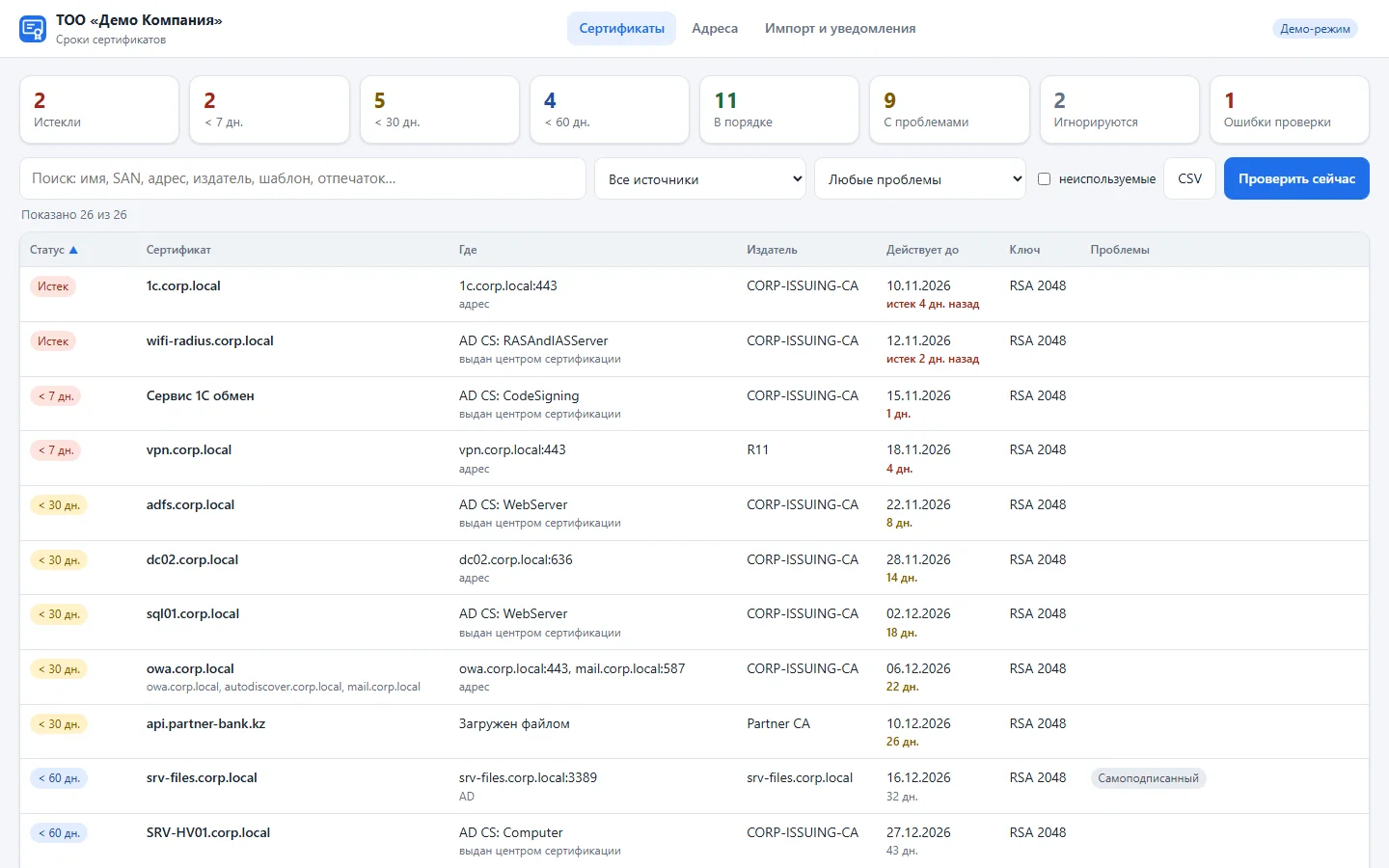
AD Certs is a service that monitors certificates within the internal network and warns in advance that it will soon expire: websites and web interfaces, mail, domain controllers (LDAPS), RDP, certificates issued by the AD CS certification authority. It operates within the company network — without internet, clouds, or external CDNs.
🔒 Since 17.11.2026, the source code of the AD Tools series is provided upon request: leave a request. The showcase of the series is github.com/WorkTime-kz/ad-tools.
| Link | |
|---|---|
| 📜 | AD Certs — source code and instructions |
In this part:
What's New (November 2026)#
Briefly, what has changed since November 13:
- 🧩 Common ad-tools-core kernel. Connection to AD (multiple controllers, only LDAPS/StartTLS), login, sessions, attempt limit, AD error codes, log, and SMTP are now shared across the entire series. At the same time, login under someone else's account through a trusted domain (
ДРУГОЙ\ivanov) is closed, and digests can also be sent to Telegram. - 🪟 Passwordless login via Kerberos (SSO) on domain computers — disabled by default; tested on Samba AD, on Windows Server AD, and not yet tested in browsers. Two options: keytab in the service itself or Kerberos on IIS/Apache (trusted proxy). Without a ticket — standard login form.
- 🇰🇿 Kazakh interface. "Rus | Қаз" switch in the header, default language — according to browser settings, the selection is remembered. Server errors and CSV export — in the selected language, digest — in
DIGEST_LANGlanguage (ruorkk). Translation prepared using AI, edits by native speakers are welcome. - ⚙️ CI on GitHub Actions: tests on Node.js 20 and 22 on Linux and Windows plus an integration run against the real Samba AD on the ad-testlab stand: login via UPN and
ДОМЕН\логин, nested groups, disabled and blocked accounts, computer unloading. - 🐞 AD CS fix: on a server with English culture, dates like
01.12.2026read as January 12, and the valid certificate was listed as expired. Now the date is partaken as day.month for any server culture. - 📦 The service can be installed together with the entire series with a single command — through ad-tools-suite.
Why#
An expired certificate is a suddenly "broken" website, mail that stopped accepting connections, or a domain controller that applications via LDAPS do not latch onto. Deadlines are scattered across dozens of servers and CA templates, and they are usually remembered when it's already too late. AD Certs collects them into one table and reminds them in advance.
Where certificates come from#
- 🌐
host:portaddress list — in.env, in a file, or directly in the panel. Standard TLS (HTTPS, LDAPS 636, SMTPS 465, IMAPS 993, and any ports), STARTTLS for SMTP, IMAP, POP3, and FTP, LDAP StartTLS (389), and RDP (3389). - 🔎 Autodiscovery: computers from AD (
dNSHostName) × a list of ports, with concurrency restrictions and timeouts. Computers not long removed from the domain are skipped; a port without TLS is not considered an error. - 🏛️ AD CS: the script
adcs/export-adcs.ps1exports issued certificates by templates viacertutil -viewto CSV, and the panel imports it. This is also visible for certificates that do not listen to the port: code signature, user, IPsec. Re-released old ones are not a concern — for the "template + name" pair, the latest one is relevant. - 📁 Files
.cer,.crt,.pem— partner certificates, CA roots, and everything that cannot be verified over the network.
What is being checked#
- Validity period: expired, less than 7, 30, and 60 days, fine (thresholds customizable).
- Chain: issuer, intermediate certificates and their terms (including interim certificates that expire earlier than the main one), trust, incomplete chain, self-signed.
- Address name mismatch with CN/SAN.
- Weak keys and algorithms: RSA < 2048, DSA, EC < 256, SHA-1/MD5 signature, TLS 1.0/1.1 protocol.
- Certificate change at address — the history shows when and where it was replaced.
Panel#
- Status table, tile filters, search by name, SAN, address, publisher, template, and fingerprint; filters by source and issue type, export to CSV.
- Certificate card: all fields, SHA-1 and SHA-256 fingerprints where it was found now and before, chain, verification history, download,
.cer. - The "ignore" mark with reason — the certificate does not appear in notifications; the mark is linked to the fingerprint and ceases to be valid when the certificate is replaced.
- "Addresses" tab: the status of each address and connection errors.
- Login with domain password or via Windows (Kerberos, optional), access group, and editor group (nested groups are considered).
- Interface in Russian and Kazakh, switch "Rus | Kaz".
Notifications#
- 📬 Digest by schedule by email (SMTP with STARTTLS), in Telegram, and/or via JSON webhook . Digest language —
DIGEST_LANG(ruorkk). Thetextfield is compatible with incoming webhooks Mattermost, Rocket.Chat, and Slack. - ⚡ An instant webhook event when the certificate moves to a more alarming level.
/healthzfor monitoring and/api/summary— only numbers by levels, without hostnames, for the indicator on the ad-portal portal.
Both notification methods are optional.
Under the hood#
Node.js 22+ (minimum 20.12) on bare node:http, the only dependency is ldapts. TLS validation — node:tls without external utilities, STARTTLS and RDP are implemented directly. Frontend on pure JavaScript without build and CDN, strict CSP without unsafe-inline. Storage — one JSON file with atomic record, no database needed. AD connection, login, sessions, attempt limit, log, SMTP, and Telegram — from the common core of the ad-tools-core series (folder src/core/). Sessions in signed HMAC cookies with exit revocation and secret rotation, login attempt limit by address and normalized login, login protection under someone else's account via trusted domain, CSRF protection, LDAP filter shielding, LDAPS/StartTLS (TLS 1.2+) only with domain controller switching.
Try it without AD#
Required Node.js 22 or newer (minimum 20.12):
npm ci
npm run demo        # http://localhost:8080, вход demo / demo
A fictional network with expired, close, and problematic certificates, AD CS, and history. In demo mode, the network is not scanned.
Check individual addresses from the command line:
npm run probe -- portal.corp.local mail.corp.local:587 dc01.corp.local:636
Lite: report without installation#
lite/cert-report.ps1 — one script for Windows PowerShell 5.1: checks the address list and saves the HTML report.
.\lite\cert-report.ps1 -Targets portal.corp.local,mail.corp.local:587,dc01.corp.local:636
The exit code 1if there are expired, close (< 30 days), or unavailable addresses — convenient for the task scheduler.
Installation in your own domain#
The repository contains detailed instructions for administrators (docs/INSTALL.md): service account, CA root certificate, .envsettings, all four sources, configuration check, Windows service (WinSW, LocalService), HTTPS for panel, Linux (systemd), Docker, scheduled AD CS upload, mail and webhook, indicator on the ad portal, and operation. Login via Kerberos (SPN, keytab, GPO for Edge/Chrome/Firefox, diagnostics) is described separately in docs/KERBEROS.md.
Project status#
- GPL-3.0 license, source code available upon request.
- Covered by autotests (48 tests per
node --test, all passing): local test servers on 127.0.0.1 — TLS with test CA, expired and weak certificates, SMTP/IMAP/POP3/FTP STARTTLS, LDAP StartTLS and RDP, HTTP API demos, PowerShell scripts, Kerberos, trusted domain login andru/kkdictionaries. In CI — on Node.js 20 and 22, in Linux and Windows. Demo mode tested in the browser. - Reading computers from AD and login are checked on a real Samba AD controller ( ad-testlab bench) with each change.
- Not yet verified: working with Windows Server AD, unloading from real AD CS (AD CS is not available on the stand, tests analyze the ready-made certutil output), real mail sending, Windows service installation.
- Therefore, we are looking for administrators ready to try it in a test environment and share what they found.
How to help#
- ⭐ Give a star to the ad-tools showcase if the project is useful.
- 🧪 Deploy in the test domain (start with
npm run demoandnpm run probe) and write in the comments what worked and what didn't. - 🏛️ Especially valuable are the feedback from those who have AD CS: how the export script performed on your CA.
- 🛠️ Questions and access requests — through the Issues storefront; after gaining access, send issues and pull requests to the service repository.
👉 Repository: source code — upon request, leave a request. Series showcase — github.com/WorkTime-kz/ad-tools.
Comments · 0
No comments yet.Sign in to comment, rate and see all comments.