AD Onboarding: hiring and firing an employee in Active Directory — according to the job template, with a change plan and checklist
🌐 Machine-translated from Russian. Show original
AD Onboarding is a web service through which HR and IT guide an employee from the onboarding card to the last working day: an Active Directory account using a job template, group template, temporary password, role-based task checklist — and dismissal in a single operation. It is deployed on an internal company server: no internet, external services, CDN, or database required.
🔒 Since 17.11.2026, the source code of the AD Tools series is provided upon request: leave a request. The showcase of the series is github.com/WorkTime-kz/ad-tools.
| Link | |
|---|---|
| 🧑 💼 | AD Onboarding — source code and instructions |
In this part:
What's New (November 2026)#
Briefly, what has changed since November 13:
- 🔗 Integration with ad-helpdesk and ad-inventory. Upon hiring, the service itself reserves a laptop or computer from the warehouse according to the job template and creates a "Prepare Workplace" request with a checklist; upon dismissal — receives a list of equipment assigned to the employee (each unit becomes a "Pick up ...") and creates a request "Pick up equipment and close access." A failure of a neighboring system does not break hiring or dismissal: the step is marked "not completed" and repeated with a button without duplicates.
- 🧩 Shared ad-tools-core core: AD connection, login, sessions, limits, and log are now shared across the entire series. Logging in
ДРУГОЙ\ivanovorivanov@другой.суффиксdoes not grant access to its namesake account. - 🪟 Login via Windows (Kerberos SSO) — optional: keytab in the service itself or Kerberos on reverse proxy (IIS, Apache); without a ticket — standard form. Tested on Samba AD, on Windows Server AD, and has not yet been tested in browsers.
- 🇰🇿 Kazakh interface. "RU | ҚАЗ" switch in the header and on the login form; errors, change plans, and statuses are sent in the requested language. Logs are maintained in Russian. Translation is prepared using AI, edits by native speakers are welcome.
- ⚙️ CI on GitHub Actions: tests on Node 20 and 22 on Linux and Windows, kernel reconciliation, parsing the Lite script with Windows PowerShell 5.1 and PowerShell 7 parsers, and integration run on the Samba AD ad-testlab stand.
- 🐞 Bug fix on Samba AD: missing attributes (
mail,manager,description) no longer turn into the "undefined" string; re-adding or removing a group member is recognized by both Windows AD and Samba codes — but the error is forgiven only if membership verification confirms the desired state. - 📦 The service can be installed together with the entire series with a single command — through ad-tools-suite.
Why#
Hiring a new employee involves a dozen actions for different people: create an account in the required OU, fill in attributes, issue groups, prepare mail and laptop, gather documents, assign a mentor. Dismissal is the same in reverse, and a forgotten group or included account remains a security hole. AD Onboarding puts this together in one process: HR fills out the card, the service builds a plan based on the job template, IT checks and executes it, and each participant sees their own checklist.
What he can do#
- 🆕 Reception. HR fills out the card: full name, position template, manager, release date. After IT service confirmation:
- creates an account in the template OU with attributes (
displayName,title,department,company,manager,employeeID,mail...) and UPN; - creates a login according to the template (
{f}.{last}→a.nurpeisova) with transliteration that takes Kazakh letters into account and selects a free option when matching; - sets a temporary password with a mandatory change on the first login — it is shown once and is not saved anywhere;
- adds template groups and forms a checklist by roles: IT — account, email, laptop; HR — documents, pass; manager — mentor, plan for the first weeks.
- creates an account in the template OU with attributes (
- 🚪 Dismissal in one operation: disable the account, replace the password with a random one, remove all groups (their list is saved in the log and application), clear the manager, record the description with the date, transfer to the dismissed person's OU. Plus the checklist "hand over equipment, close access."
- ↩️ "Return Employee" — restores the OU, the group, and the manager.
- 👁️ "plan only" mode. Before each run, you can see exactly what will change in AD.
PLAN_ONLY=trueenable it for the entire service — convenient for pilots on the real catalog. - 📋 Position templates: OU, groups, position and department, additional checklist items, issuance techniques.
- 👥 Roles by AD groups based on nesting: HR, IT, observer; the manager sees their requests and marks their points.
- 📜 A log of all actions — logins, plans, every change in AD, checklist marks — in a JSON Lines file and, optionally, in SIEM.
- 🔗 Combination with ad-helpdesk and ad-inventory: upon hiring — request "prepare workplace" and reserve equipment according to the job template; upon dismissal — request "pick up equipment and close accesses" and list of assigned equipment in the checklist. Failure of another system does not break hiring or dismissal: the step is marked "not completed" and repeated with a button.
- 🌐 Webhooks and links for any other system (n8n, Power Automate, custom ticket system).
- 🪟 Login via Windows (SSO, Kerberos) — optional, without entering a password on computers in the domain.
- 🇰🇿 Interface in Russian and Kazakh — switch "RU | ҚАЗАҚ", default — browser language.
- ⚡ Lite version — PowerShell script for bulk acceptance and dismissal from CSV with
-WhatIf.
Security#
The service modifies AD, so it is designed for minimal rights:
| Measure | How is |
|---|---|
| Minimum rights | Separate service account with delegation only to the OU of employees, dismissed OUs, and access group member attribute. dsacls commands — in the |
| Protected objects | Does not add built-in privileged groups (by SID) and your DENY_GROUP_DNSlist to groups with adminCount=1; does not fire accounts with adminCount=1 and built-in Administrator/krbtgt; Template OU — only inside ALLOWED_OUS |
| Plan before writing | The plan is rebuilt from the current AD state right before execution; if the password cannot be set, the created account is deleted (rollback) |
| Encryption only | AD — only LDAPS or StartTLS with certificate validation; web — only HTTPS (HTTP only in demo) |
| Passwords | Temporary password — crypto-resistant generator, all character classes; not stored in the application, log, or webhook |
| Login | Domain password; limits on failed attempts by login (in any typeface) and by IP; logging in through a trusted domain does not grant access to your account with the same name |
| Sign-in via Windows | Optional — Kerberos (SSO) in the service itself via keytab or on a reverse proxy (IIS, Apache), proxy header accepted only from trusted addresses; without a ticket — standard form. Tested on Samba AD, on Windows Server AD, and in browsers, not yet tested |
| Linking with neighboring services | the ad-helpdesk and ad-inventory integration APIs — by the integration token |
| Sessions and CSRF | Signed HMAC cookie HttpOnly; SameSite=Strict; Secure; changes only POST application/json with Origin |
| Input | Shielding LDAP filters (RFC 4515) and DN (RFC 4514), whitelisting fields |
| Browser | Strict CSP without unsafe-inline, X-Frame-Options: DENY, no external resources |
Under the hood#
Node.js 22+ on bare node:http. The only dependency is the ldaptslibrary. Connection to AD, login, sessions, Kerberos, and journal — common core of the ad-tools-core series (folder src/core/). Frontend on vanilla JavaScript without assembly, ru/kk dictionaries — in public/i18n/, journal — JSON Lines. Lite version — Windows PowerShell 5.1 and RSAT.
Try it without AD#
Required Node.js 22 or newer:
npm ci
npm run demo        # http://localhost:8111
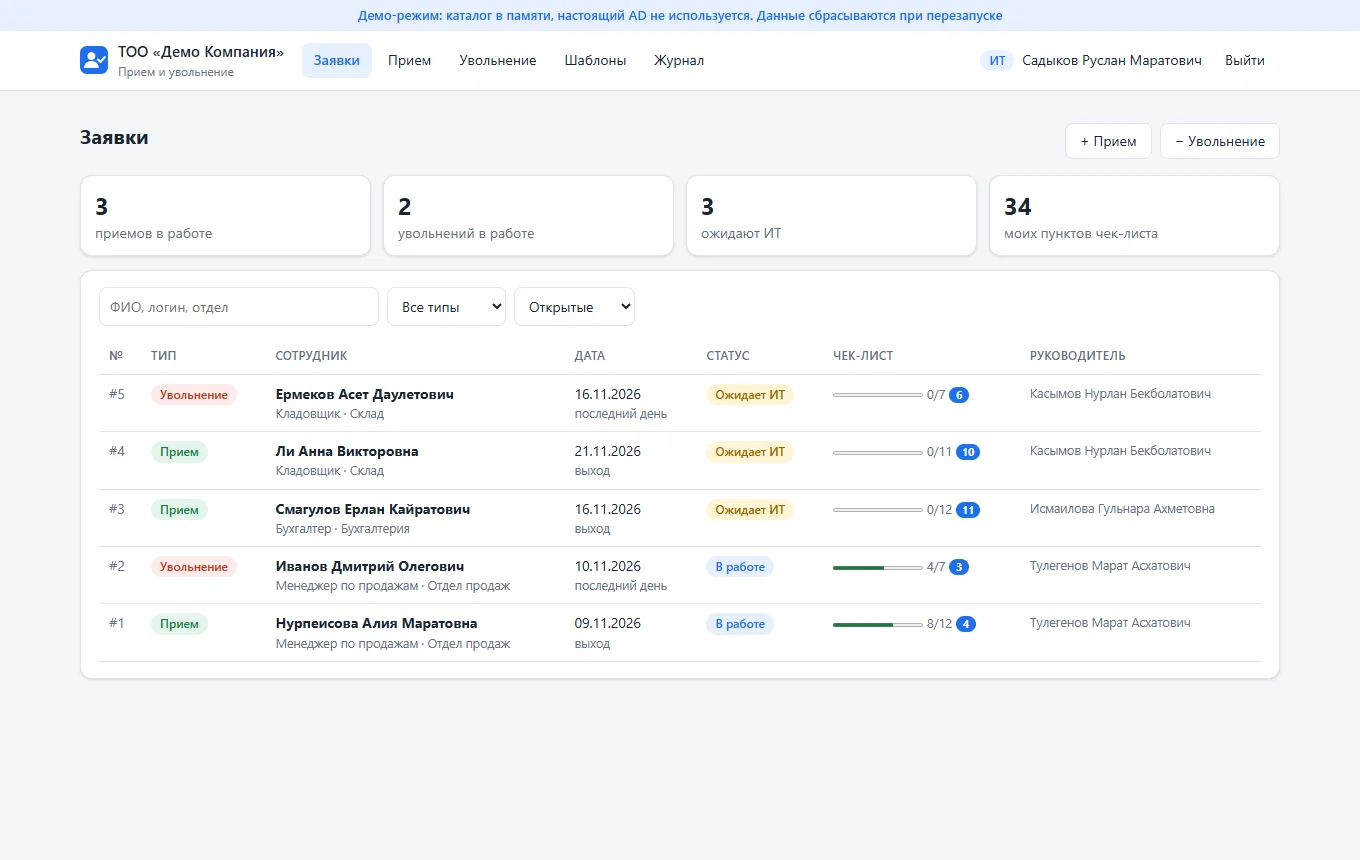
The directory is stored in memory (17 fictional employees, department OUs, groups), AD is not used. The password for all demo users is demo, and there are quick login buttons on the login page:
| Login | Role | What to check |
|---|---|---|
r.sadykov | IT | Fulfill pending requests, return the dismissed, edit templates, |
a.seitkali | HR | Formalize hiring and dismissal, mark HR |
o.kim | Observer | Only view applications and log |
m.tulegenov | Head | Their applications and 'Manager' items |
Try firing admin.sadykov — the service will refuse: the account is privileged.
Instead of ad-helpdesk and ad-inventory, the demo uses built-in stubs: for hiring, the reserve and application number are visible, and for completed dismissals, ad-helpdesk crashes on the first attempt and a "Retry" button.
Installation in your own domain#
Briefly for Windows:
npm ci --omit=dev
copy .env.example .env      # заполнить
npm run check-ldap          # проверка подключения (только чтение)
powershell -ExecutionPolicy Bypass -File .\deploy\windows\install-service.ps1
The repository includes step-by-step instructions for administrators (10 steps): OU structure and role groups, service account, and detailed delegation of rights to the OU — operations and rights table, dsaclscommands, delegation wizard, and validation; certificates for LDAPS and HTTPS, configuration .env, pilot in "plan only" mode, Windows service (WinSW under LocalService), systemd, Docker, job templates, integrations (including tokens for ad-helpdesk and ad-inventory), Lite version, and operation. Windows login — separately in docs/KERBEROS.md: SPN, ktpass, variables, GPO, IIS, and Apache.
Lite version#
lite/ad-onboarding-lite.ps1 — for one-time mass hiring or dismissal without a web service:
.\lite\ad-onboarding-lite.ps1 -Mode Hire -CsvPath .\lite\hire.example.csv -WhatIf
.\lite\ad-onboarding-lite.ps1 -Mode Fire -CsvPath .\lite\fire.example.csv -DisabledOU "OU=Уволенные,DC=corp,DC=local" -WhatIf
Nothing changes from -WhatIf — only the report. Without it, the script makes changes and writes a report (temporary passwords, removed groups) and a log.
Project status#
- GPL-3.0 license, version 1.0.0; source code is available upon request.
- Covered by autotests (53 tests per
node --test, all passing): acceptance and dismissal logic, role rights, "plan only" mode, webhooks, linking with ad-helpdesk and ad-inventory, rollback, CSRF, login attempt limit, spoofing cookies, Kerberos,ru/kkdictionaries, and LDAP queries on fake directories. In CI — on Node 20 and 22, in Linux and Windows. The demo mode is fully tested in the browser under all four roles. Lite script in CI is parsed by Windows PowerShell 5.1 and PowerShell 7. - The LDAP code is checked on a real Samba AD controller (ad-testlab bench) with every change: full onboarding and dismissal cycles from delegated service accounting, new employee login, "switch on login," re-adding and removing from the group, SID recognition of "Domain Administrators," AD refusal when creating outside authorized OUs, and when changing a privileged group.
- Operation on Windows Server AD has not yet been verified, and the Lite script on the domain has not run. Windows installation and the Docker image have also not been verified.
- Therefore, we are looking for administrators willing to try it in a test domain — it's convenient to start with the "plan only" mode.
How to help#
- ⭐ Give a star to the ad-tools showcase if the project is useful.
- 🧪 Deploy in the test domain with
PLAN_ONLY=true(start withnpm run demoandnpm run check-ldap) and write in the comments what worked and what didn't. - 📝 Share your job templates and checklists — which hiring and firing points you need.
- 🛠️ Questions and access requests — through the Issues storefront; after gaining access, send issues and pull requests to the service repository.
👉 Repository: source code — upon request, leave a request. Series showcase — github.com/WorkTime-kz/ad-tools
Comments · 0
No comments yet.Sign in to comment, rate and see all comments.