AD OrgChart: an interactive company organizational structure from Active Directory — a website and a Lite version in one script
🌐 Machine-translated from Russian. Show original
AD OrgChart is the site "Company Organizational Structure" that builds a subordination tree for the "Manager" field (manager) in Active Directory. It is deployed internally within the company: no internet, external services, CDNs, or database required. AD is readable.
🔒 Since 17.11.2026, the source code of the AD Tools series is provided upon request: leave a request. The showcase of the series is github.com/WorkTime-kz/ad-tools.
At the same time, the project shows how neatly AD is filled: subordinate cycles, dismissed managers, employees without department and position appear in a separate report.
The project has two versions in one repository: a full-fledged server site and Lite — a single PowerShell script that assembles an HTML file.
| Link | |
|---|---|
| 🌳 | AD OrgChart — full version and Lite (lite/orgchart.ps1) |
In this part:
What's New (November 2026)#
- 🧩 Common ad-tools-core kernel. AD connection, login, sessions, limits, and logging are now common across the entire AD Tools series (folder
src/core/). A fix in the kernel is sent to the service by thenpm run sync-corecommand, andnpm testchecks that the kernel was not manually edited. - 🪟 Login via Windows (Kerberos/SPNEGO) without a password from the domain computer — either in the service itself or on IIS/Apache. Status: verified on Samba AD, on Windows Server AD, and in browsers — not yet, so disabled by default; the usual sign-in form remains a fallback path.
- 🇰🇿 Interface in Russian and Kazakh: toggle "Rus | Қаз" on each page, language by browser settings with memory, dates and numbers in the format of the selected language. Kazakh translation prepared using AI — edits by native speakers are welcome.
- 🏖️ Who is on vacation — a bundle with AD Absence: a colored mark on the card in the tree and "On vacation until November 20, replaced by Kim V. S." in the employee panel. The organizational structure server takes statuses by token and caches them for 3 minutes; only the status, dates, and substitution are sent to the browser.
- ✅ CI on GitHub Actions: unit tests for Node.js 20 and 22 on Linux and Windows and integration tests against real Samba AD on the ad-testlab booth — login via UPN and
ДОМЕН\логин, nested groups, disabled and locked accounts, page-by-page uploading,check-ldap. - 📦 Installing the entire series at once — ad-tools-suite: one configuration file instead of fifteen
.env, HTTPS, and the name of theorgchart.corp.localform via Caddy, summary check. The token for linking with AD Absence is created by the generator itself.
Why#
The organizational structure diagram is usually drawn manually in Visio or PowerPoint — and it becomes outdated after the employee's first transfer. At the same time, "who reports whom" relationships are often already present in Active Directory: the user card has a "Manager" field. AD OrgChart turns it into a living tree that updates itself — without double entry.
And if the field is filled with errors, it's immediately obvious: the data quality report will tell you who and how to fix in AD.
Full version: site on the server#
What they can do:
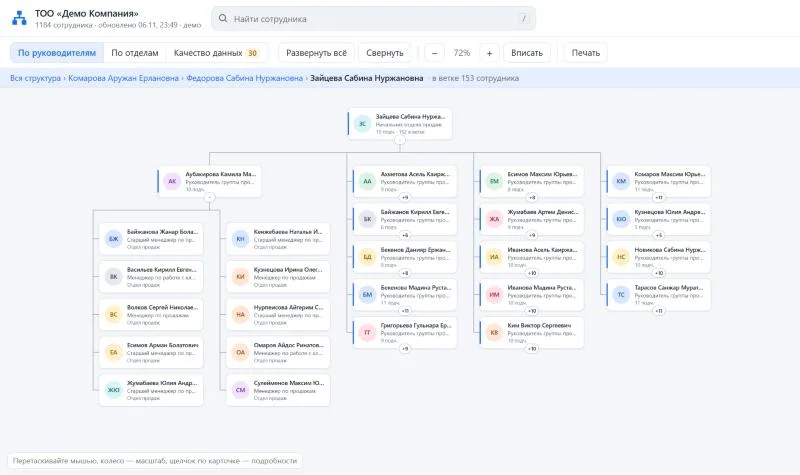
- 🌳 Tree by leaders: nodes collapse and expand, scale with mouse wheel and buttons, drag with mouse or finger. Node — photo, full name, position, and number of subordinates: direct and throughout the branch.
- ⚡ Fast on large companies: lines are drawn on canvas, cards are created only for the visible part of the screen. According to README measurements, for 10,000 employees, it takes about 20 ms to reveal the entire tree.
- 🔍 Searching for an employee by full name, position, department, login, and email — by navigating to their node: the branch opens, the node is highlighted. The layout corrects itself:
bdfyjd→ "Ivanov." - 🏢 The "By Departments" view — grouping by attribute
department, within the department subordination is maintained. - 🧭 The tree root is set by the
ROOT_LOGINsetting or automatically determined — an employee without a supervisor with the largest branch. The rest are shown in the "Other Roots" and "Without Supervisor" groups. - 🔁 Loop protection in
manager(A → B → A): the loop breaks, the tree is still built, and the problem is reported. - 🩺 Data quality report: empty manager; manager disabled, out-of-sample, or deleted; cycles; employees without department and position. Navigating to an employee in the tree, exporting to CSV, and hints on how to fix in AD, such as
Set-ADUser логин -Manager логин_руководителя. - 📤 Branch export: print, SVG, and PNG (with photos), link to the branch — a colleague will open it.
- 👤 Employee card: contacts, manager, chain of command, subordinates.
- 🏖️ Who is on vacation (optional, with AD Absence): mark on the card, dates, and deputy.
- 🔐 Domain password login is optional, with access only for AD group members.
- 🪟 Optional Windows (Kerberos) login is experimental, see above.
- 🇰🇿 Russian and Kazakh interface.
- 🌓 Light and dark themes, responsive phone layout.
Security: AD is read-only, passwords are not stored anywhere, strict CSP and other protected headers, login attempts limited, CSV protection against formulas. One dependency is the ldaptslibrary, frontend without builds and without CDN.
Connecting to AD: LDAPS or StartTLS, multiple domain controllers with failover in case of failure, page-by-page unloading. Data is stored in memory and updated on a schedule — by default every 30 minutes.
Where it takes place:
| Platform | How |
|---|---|
| Windows Server | Windows service (WinSW, LocalService) |
| Linux | systemd service |
| Docker | docker compose up -d --build |
| HTTPS | embedded (PFX or CRT+KEY) or via nginx |
| Serverless | lite/orgchart.ps1 — HTML file scheduled |
| The entire AD Tools series | ad-tools-suite: Docker, Windows Server, or Linux for Caddy |
Quick start#
Try without AD — demo for ~1200 test employees. Errors are specifically entered into the data (cycle, employees without supervisor, disabled supervisor) so that the quality report is visible:
npm ci
npm run demo        # http://localhost:8080
The demo size is set by the variable DEMO_SIZE, for example, DEMO_SIZE=10000 npm run demo.
With connection to your AD:
cp .env.example .env    # заполнить LDAP_URL, LDAP_BIND_DN, LDAP_BIND_PASSWORD, LDAP_BASE_DN
npm run check-ldap      # проверка подключения, корень дерева и сводка о качестве данных
npm start
The repository includes detailed step-by-step instructions: preparing data in AD (including bulk managerial population from Excel via PowerShell), service account, LDAPS validation, installation on Windows Server, Linux, and Docker, DNS name, HTTPS, domain password login, distributing to employees, operation, troubleshooting, security checklist, AD Absence link, general kernel parameters, and a separate Windows sign-in document (Kerberos).
Requirements: Node.js 20.12+ or Docker, domain controller access via ports 636/389.
Lite: one script#
Don't want to install a server? Lite is a single lite/orgchart.ps1 file for Windows PowerShell 5.1, without Node.js, settings, or passwords. The script reads the AD of the current domain and assembles one HTML file with a tree, search with layout fix, "Other Roots" and "No Leader" groups, loop protection, and a data quality summary. The file can be placed on a shared drive.
.\lite\orgchart.ps1 -Demo                                         # посмотреть на тестовых данных
.\lite\orgchart.ps1 -OutFile \\fs01\Public\Оргструктура.html       # собрать из AD
.\lite\orgchart.ps1 -OutFile \\fs01\Public\Оргструктура.html -Install   # обновлять каждые 2 часа
With -Install , the script creates a scheduler task as SYSTEM: on the computer in the domain, it reads AD on behalf of the computer account, so no password is needed. The period is changed by the -EveryMinutesparameter , delete — -Uninstall. Other parameters: -SearchBase — only the required OU, -RootLogin — explicit root, -Photos — embed photo.
The HTML file contains full name, positions, phone numbers, and email — place it where only employees have access.
Which version to choose#
| Lite | Full | |
|---|---|---|
| Installing | a single PowerShell script | a server: Windows, Linux, or Docker |
| Update | data on a schedule, by default every 2 hours, | by default every 30 minutes |
| View "By departments" | not | yes |
| Export to SVG and PNG | no | to |
| Login with domain password | none — the file can be seen by anyone with folder access | yes, with AD group restrictions; Windows login is experimental |
| Check disconnected managers | no | yes |
| Who is on leave (AD Absence) | not | yes, optional |
| Interface language | Russian | Russian and Kazakh |
Lite — to quickly show the organizational structure today. Lite — when you need a closed site with a departmental view, export, and a complete data quality report.
Project status#
- GPL-3.0 license; source code is available upon request.
- The full version is covered by autotests (45 tests) on Node.js 20 and 22 on Linux and Windows; with each push — an integration run against the real Samba AD on the ad-testlab stand. Demo mode tested in the browser: tree, search with layout corrections, department view, quality report, PNG and SVG export, printing, themes, mobile version.
- Working with Windows Server AD has not yet been tested — as well as installation by the service (WinSW, systemd, Docker), schedule in Lite, and photos from AD. Therefore, we are looking for administrators ready to try it themselves and share what they found.
How to help#
- ⭐ Give a star to the ad-tools showcase if the project is useful.
- 🧪 Try it on your domain (start with
npm run check-ldapor.\lite\orgchart.ps1 -Demo) and write in the comments what worked and what didn't. - 🇰🇿 Correct the Kazakh translation in
public/i18n/kk.json. - 🛠️ Questions and access requests — through the Issues storefront; after gaining access, send issues and pull requests to the service repository.
👉 Repository: source code — upon request, leave a request. Series showcase — github.com/WorkTime-kz/ad-tools
Comments · 0
No comments yet.Sign in to comment, rate and see all comments.