AD Polls: internal polls and password-enabled domain login voting — and honest anonymous mode
🌐 Machine-translated from Russian. Show original
AD Polls is an internal polling and voting service for companies with Active Directory. Employees log in with their domain login and password and respond to the surveys, while HR, internal communications, and managers collect the surveys in the builder and view the results with charts. It is deployed within the company network: without the cloud, CDN, or internet access.
🔒 Since 17.11.2026, the source code of the AD Tools series is provided upon request: leave a request. The showcase of the series is github.com/WorkTime-kz/ad-tools.
| Link | |
|---|---|
| 📊 | AD Polls — source code and instructions |
In this part:
What's New (November 2026)#
- 🧩 Common ad-tools-core core. Connection to AD, login parsing, login, sessions, attempt limit, and log are now common across the entire AD Tools series (folder
src/core/). Login under someone else's account via domain trust is closed:ДРУГОЙ\ivanovorivanov@другой.суффиксdoes not match its ownivanov. The attempt limit is not limited by changing the login typeface. After the update, users will log in once again — the session cookie format has changed. - 🪟 Login via Windows (Kerberos/SPNEGO): on the domain computer, polls open without a sign-in form — Kerberos in the service itself (keytab) or on IIS/Apache before it. Status: verified on Samba AD; not tested on Windows Server AD or browsers yet. Disabled by default, without a ticket — regular form.
- 🇰🇿 Interface in Russian and Kazakh: "Rus | Қаз" toggle on all pages and in the widget, browser settings with memory, dates and numbers in
kk-KZformat, server errors — also in the selected language. Questions entered by the author are not translated. The Kazakh translation was prepared using AI — edits by native speakers are welcome. - ✅ CI on GitHub Actions: tests on Node.js 20 and 22 on Linux and Windows and integration run against the real Samba AD controller from ad-testlab — login in various forms, disabled and blocked accounts, roles by nested groups, search for groups and OUs, audience size,
check-ldap. - 📉 Requirements are softer: minimum version — Node.js 20.12 (recommended 22+).
- 📦 Installing the entire series at once — ad-tools-suite: one settings file instead of fifteen
.env, HTTPS, and thepolls.corp.localtype name via Caddy, summary verification. The generator enters the portal address inEMBED_ORIGINS, and the portal — the survey address for the "Today" section.
Why#
Engagement surveys or company polls are usually collected through external online forms: responses go beyond the perimeter, and the promise of "anonymous polling" is kept on an honest word. AD Polls operates within the network, letting only domain employees in and showing everyone surveys of their audience. And the anonymous mode is set up so that it is impossible to determine who answered how from stored data — and the documentation honestly states where this guarantee ends.
What he can do#
- 🧱 Survey builder: one option, multiple options, scale (1–10, 0–10, or up to 5; NPS is considered NPS for scales up to 10), and free text; each question has a "required" flag. Drafts and one-button copy of the survey.
- ⏱️ Expiration date: the survey closes automatically; the author can finish it earlier or resume.
- 👥 Audience: all employees or members of selected AD groups (with nested) and accounts within the selected OUs; search for groups and OUs directly in the designer.
- 🪪 Two modes: named (the author sees who and when answered) and anonymous (more details below). After publication, questions, audience, and mode do not change.
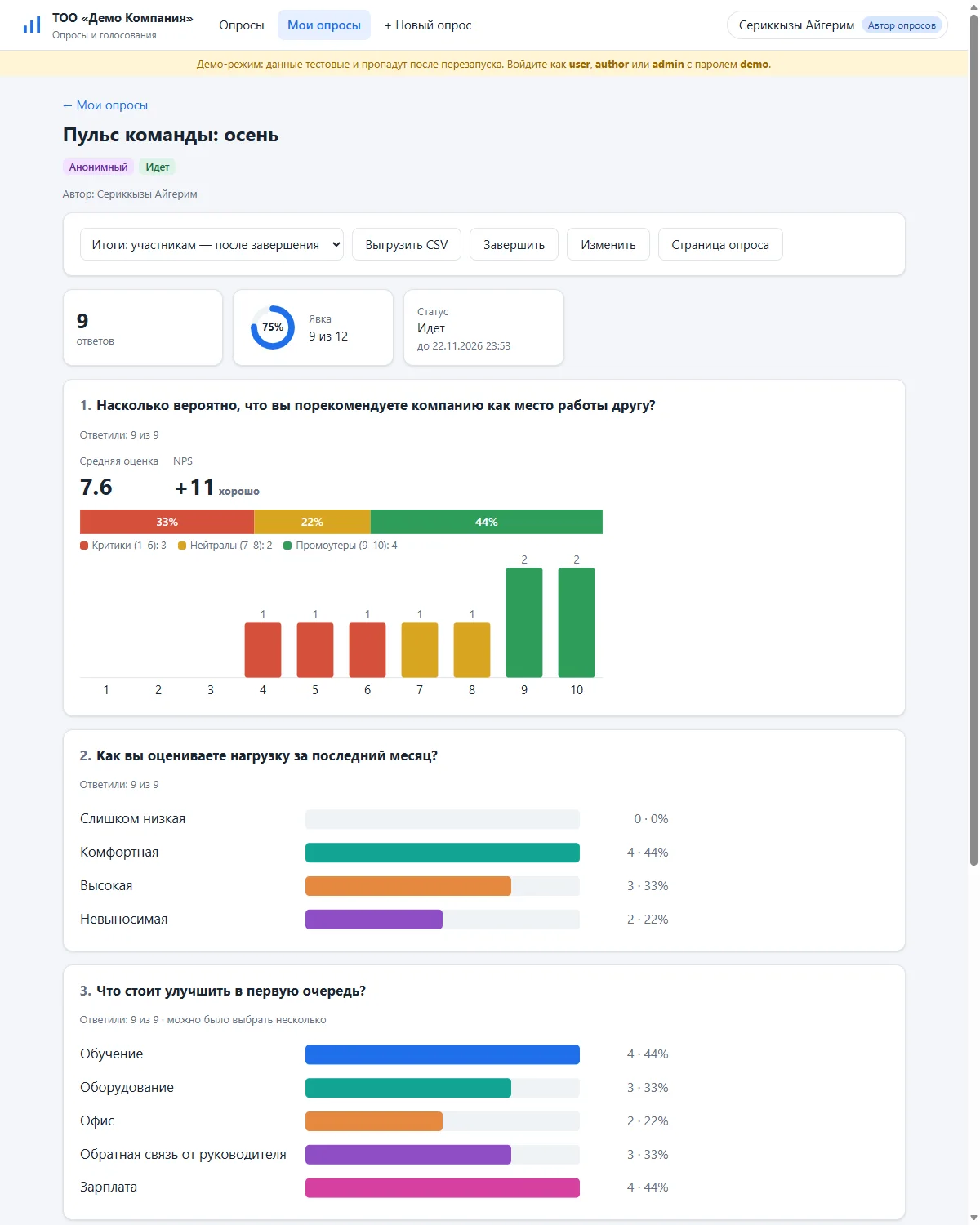
- 📈 Results in plain SVG: bars by variants, distribution of ratings, NPS (critics, neutrals, promoters), average rating, turnout based on audience size.
- 🏢 Breakdown by departments: small departments are combined so that their answers cannot be calculated by subtraction from the total total.
- 📤 CSV export for Excel (UTF-8 with BOM,
;separator, formula protection). - 📣 Results for participants — at the author's choice: only to the author, immediately after the answer, or after the survey ends. Participants see summary numbers, without text answers or names.
- 🔐 AD group roles: survey authors and administrators; other employees respond to their audience surveys.
- 🪟 Optional sign-in via Windows (Kerberos) — see above.
- 🇰🇿 Russian and Kazakh interfaces, including widget (the widget language can be rendered as
?lang=kk). - 🧩 Integration into the portal:
GET /api/active— surveys that the user has not yet responded to, and a ready-made/widgetwidget for iframe. Suitable for ad-portals and any other portal.
How anonymous mode works#
To prevent a person from voting twice, the server must know that they have already answered. Therefore, an anonymous poll contains two independent parts:
| Part | What's inside | What's not there |
|---|---|---|
| Who answered | logins, sorted alphabetically | voting order and time, and related to |
| Replies | only replies (and department, if the author included breakdown) | login, name, DN, time, |
Additionally:
- the ballot is inserted into a random location on the list, it has no timestamps;
- responses are recorded in batches (by default 3): three logins and three ballots appear in the file simultaneously, so comparing two copies of the file returns a group of people rather than a specific person;
- summary, breakdown, and export are not available to anyone, including the author and administrator, until responses are below the threshold (default is 5);
- There is no anonymous voter login in the service log.
What the mode does not guarantee is that this is contained in a separate document in the repository: the server administrator can see how someone responded at the moment of voting (memory dump, debugger, code substitution); proxy logs narrow the scope with query time; text responses, unanimity, and a small audience can reveal people; the very fact of participation is not secret. Anonymity here is organizational-technical, not cryptographic, and employees should talk about this directly.
Under the hood#
Node.js 20.12+ (recommended 22+) on a clean node:http. The only dependency is the ldaptslibrary. Frontend on vanilla JavaScript without build and no external resources, strict CSP without inline scripts and styles.
- Login — bind to the domain controller, password is not saved anywhere. Multiple controllers with failover control, LDAPS or StartTLS with certificate validation, LDAP filter shielding according to RFC 4515, nested groups. AD connection, login, sessions, and limits — common ad-tools-core core.
- Session — signed HMAC-SHA256 cookie. Login attempt limit: 10 per 15 minutes per IP and login (
CORP\Ivanov,ivanov@corp.local, andIVANOV— one counter). CSRF protection: modifying requests — onlyapplication/jsonand only from your Origin. - The data is a single JSON file with atomic record. The service is designed for companies with up to several thousand employees.
Try it without AD#
Needed Node.js 20.12 or newer (recommended 22+):
npm ci
npm run demo        # http://localhost:8080
Log in as user (employee), author (survey author), or admin with the password demo. The demo already includes an anonymous engagement survey with NPS, roll-call voting, completed survey, and draft. Data is stored in memory and disappears after stopping.
Installation in your own domain#
The repository contains detailed instructions for administrators (docs/INSTALL.md): preparing AD, configuring .env, HTTPS, checking connection with the npm run check-ldapcommand, installing it with Windows service (WinSW under LocalService), on Linux (systemd) and in Docker, an example of an nginx configuration, embedding in the corporate portal, backup, and common issues. Windows login is described in a separate document docs/KERBEROS.md. The entire AD Tools series can be installed at once via ad-tools-suite.
Requirements: Node.js 20.12+, recommended 22+ — library ldapts 9 officially supports Node.js 22+, on Node.js 20 the service displays a warning (not required for Dock Node.js er), access to domain controllers via LDAPS (636) or LDAP 389 with StartTLS, service account with directory readability, certificate for HTTPS. According to the instructions, 1 vCPU and 256 MB of memory are sufficient.
Project status#
- GPL-3.0 license, source code available upon request.
- Covered by auto-tests (45 tests per
node --test, all passing) on Node.js 20 and 22 on Linux and Windows, including separate anonymity tests: the data file searches for logins, names, DN, and timestamps in ballots, and checks that ballot order does not depend on voting order. Demo mode tested in the browser. - The LDAP part is checked with an integration run against the real Samba AD on the ad-testlab booth with each push. Working with Windows Server AD has not yet been verified, nor has it installed by the Windows service, via systemd and in Docker.
- To embed a widget or list of active surveys on the main ad-portal, you need to extend the CSP in the portal — this is described in the instructions.
- Therefore, we are looking for administrators ready to try it in a test domain and share what they achieved.
How to help#
- ⭐ Give a star to the ad-tools showcase if the project is useful.
- 🧪 Deploy in the test domain (start with
npm run demoandnpm run check-ldap) and write in the comments what worked and what didn't. - 🔍 Take a fresh look at the anonymity model — comments from HR and security staff are especially valuable.
- 🇰🇿 Correct the Kazakh translation in
public/i18n/kk.json. - 🛠️ Questions and access requests — through the Issues storefront; after gaining access, send issues and pull requests to the service repository.
👉 Repository: source code — upon request, leave a request. Series showcase — github.com/WorkTime-kz/ad-tools.
Comments · 0
No comments yet.Sign in to comment, rate and see all comments.