AD Rooms: booking meeting rooms and workstations with password Active Directory login and kiosk at the door
🌐 Machine-translated from Russian. Show original
AD Rooms is a service for booking meeting rooms and workspaces for companies with Active Directory. It is deployed on a server within the company's network: it does not require internet, external services, or CDNs. Employees log in with a domain login and password, while administrators are defined by the AD group.
🔒 Since 17.11.2026, the source code of the AD Tools series is provided upon request: leave a request. The showcase of the series is github.com/WorkTime-kz/ad-tools.
| Link | |
|---|---|
| 🗓️ | AD Rooms — source code and instructions |
In this part:
What's New (November 2026)#
- 🧩 Shared ad-tools-core kernel. Multi-controller connection (LDAPS/StartTLS only), login and login parsing, AD error codes, signed sessions, attempt limit, and log are now shared across the entire AD Tools series (folder
src/core/). Login under someone else's account via domain trust is closed:ДРУГОЙ\ivanovandivanov@другой.суффиксdo not map to their ownivanov. Headers areX-Forwarded-*accepted only from trusted proxies. After the update, employees will log in once again — the cookie format has changed. - 🪟 Passwordless login via Kerberos: on the Edge and Chrome domain computers, log in on your own — with a Kerberos ticket in the service (keytab) or via IIS/Apache. Status: verified on Samba AD, on Windows Server AD, and not yet available in browsers; disabled by default, without a ticket — standard form. The kiosk by the door is untouched.
- 🇰🇿 Interface in Russian and Kazakh: switch "RU / ҚАЗАҚ" on all pages, including kiosk, default language — as in the browser. Both server errors and invitation emails have been translated: their language is set for the entire service (
MAIL_LANG=ruorkk). The Kazakh translation was prepared using AI — edits by native speakers are welcome. - ✅ CI on GitHub Actions: tests on Node 20 and 22 on Linux and Windows (on Node without
node:sqlitedatabase tests are skipped, with explanations) and a run against the real Samba AD from ad-testlab. - 🐞 Fix for running on Samba AD: for an employee without mail in AD, the e-mail field was line
undefined, now it is empty. - 📦 Installing the entire series at once — ad-tools-suite: one configuration file instead of fifteen
.env, HTTPS, and the type namerooms.corp.localthrough Caddy, summary check.
Why#
Meeting rooms are booked however they can: in the general chat, in the spreadsheet, or simply taken if the door is open. At the same time, employees, their mail, departments, and groups are already in Active Directory. AD Rooms relies on this data: login by domain password, meeting participants from the AD directory, permissions by groups. No separate accounts need to be created.
In AD, the service only reads: checks password upon login, group membership, and uploads the employee list every hour. Bookings, rooms, and logbooks are stored in a single file data/rooms.db.
What he can do#
- 🔐 Domain password login. The password is checked directly on the domain controller and is not saved anywhere. Only members of the required group can be allowed into the service.
- 🪟 Passwordless login via Kerberos optional — see above.
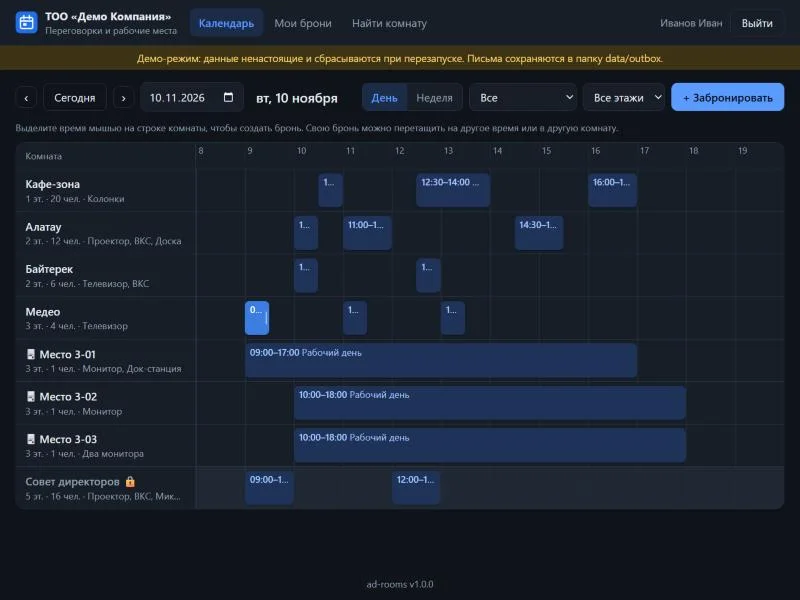
- 🗓️ Calendar for the day and week with a grid by rooms, filters by type (meeting or workspaces) and by floor.
- 🖱️ Reservation with a mouse or form. Select time on the room line — the form will open. You can drag your reservation to another time or to another room, and drag it beyond the right edge.
- 🚫 No crossovers. The server checks for occupancy and records reservations in one SQLite transaction (
BEGIN IMMEDIATE), the second protection is a trigger in the database itself. The test sends 20 simultaneous requests at a time, and exactly one is successful. - 🔁 Recurring bookings: every day, on working days, or on selected days of the week with intervals. If some dates are taken, the service will show them and offer to book only available ones. You can cancel one appointment or "this one and all next."
- 👥 Participants from AD: search by full name, login, email, and department. Addresses are taken from the directory — manually inserting someone else's address is not allowed.
- 📧 Invitations
.icsto email via SMTP (optional): "Accept" and "Decline" buttons in Outlook, updates for rescheduling and cancellation. Any reservation can be downloaded as a.icsfile. - 🔎 Search for a free room for a set time, number of people, and equipment. "My Bookings" — meetings where you are the organizer or participant.
- 🛠️ Room admin: name, type, floor, capacity, equipment, description, photos, and order in the list. Room booking can be limited to an AD group, for example, "Guides."
- 📜 Activity log: logins, bookings, transfers, cancellations, room changes, emails — with search and retention periods.
- 🇰🇿 Russian and Kazakh interface, including kiosk and invitation letters.
- 🌓 Light and dark themes, adaptive layout.
Security: strict CSP, CSRF protection, login attempt limitation, protection against logging under someone else's account via a trusted domain. One external dependency — library ldapts; base — built-in node:sqlite, frontend without builds.
Kiosk at the door#
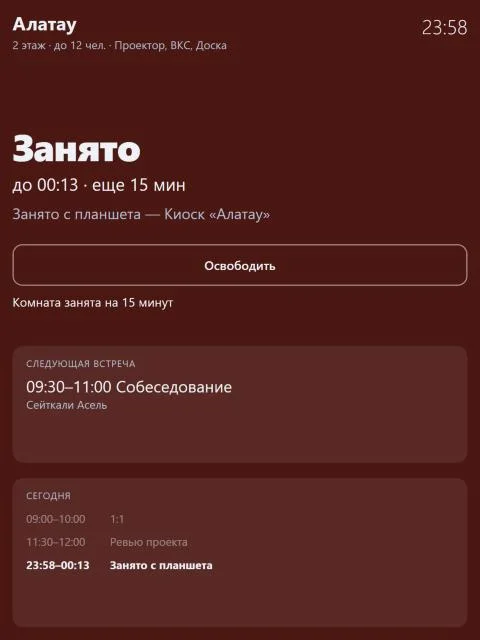
The tablet near the meeting room shows "Free" on a green background or "Busy" on a red background, the next meeting, and today's schedule. The background turns yellow if less than 15 minutes remain until the next booking. The "Occupy for 15/30 minutes" and "Vacate" buttons are for those who entered without a reservation. Only reservations created from the tablet can be released from the tablet: you cannot cancel someone else's meeting from the corridor.
No kiosk login is required: access is via a secret link, and only the token hash is stored in the database. Hide meeting topics in the hallway — KIOSK_SHOW_TITLES=false.
Try and install#
Demo without AD — data is stored in memory, emails are saved in data/outbox/*.emland can be opened in Outlook:
npm ci
npm run demo        # http://localhost:8080
- Login
demo/demo— administrator,ivanov/demo— employee,petrov/demo— member of the "Management" group. - Kiosk:
http://localhost:8080/kiosk/demo-kiosk-1.
With his AD:
cp .env.example .env    # заполните LDAP_*, ADMIN_GROUP_DN, SESSION_SECRET
npm run check-ldap      # проверка подключения, групп и почты
npm start
Where it takes place:
| Platform | How |
|---|---|
| Windows Server 2016+ | Windows Service (WinSW) |
| Linux (Ubuntu 22.04+, Debian 12+) | systemd |
| Docker | docker compose up -d --build |
| HTTPS | embedded (PFX) or nginx/IIS before the |
| The entire AD Tools series | ad-tools-suite: Docker, Windows Server, or Linux for Caddy |
The repository contains detailed instructions for administrators (docs/INSTALL.md): preparing groups and mail in AD, service account, LDAPS verification, installation on Windows Server, Linux, and Docker, DNS name, HTTPS, SMTP, room creation and tablet setup, shortcut assignment via GPO, passwordless login via Kerberos, backup, troubleshooting, and security checklist.
Requirements: Node.js 22.13 or newer (LTS 22 or 24 recommended) or Docker, 1 vCPU and 512 MB RAM, a service account in AD with readable rights, and a booking administrator group.
Why there is no Lite version#
Other tools in the series have Lite — a single PowerShell script that collects static HTML from AD. For bookings, this won't work: reservations are a record, not a read. You need a server that accepts bookings from many people at once and atomically prohibits crossings, you need a login to understand whose reservation and who has the right to cancel it, and the kiosk, "My Reservations," and emails only work when the server is live. Therefore, AD Rooms exists only in its full version.
Project status#
- GPL-3.0 license, source code available upon request.
- Covered by 53 autotests (
node --test): reservation rules, replays, iCalendar, SMTP, HTTP API, trusted domain login, and Kerberos, interface language. In CI, tests run on Node 20 and 22 on Linux and Windows, and with each push — a run against the real Samba AD on the ad-testlab stand. Demo verified in the browser. - Working with Windows Server AD has not yet been tested — just like sending invitations via a real mail server in Outlook and installing it via Windows, systemd, or Docker. Therefore, we are looking for administrators ready to try it themselves and share what they achieved.
How to help#
- ⭐ Give a star to the ad-tools showcase if the project is useful.
- 🧪 Try it on your domain (start with
npm run demo, thennpm run check-ldap) and write in the comments what worked and what didn't. - 🇰🇿 Correct the Kazakh translation in
public/i18n/kk.json. - 🛠️ Questions and access requests — through the Issues storefront; after gaining access, send issues and pull requests to the service repository.
👉 Repository: source code — upon request, leave a request. Series showcase — github.com/WorkTime-kz/ad-tools
Comments · 0
No comments yet.Sign in to comment, rate and see all comments.