🌐 Machine-translated from Russian. Show original
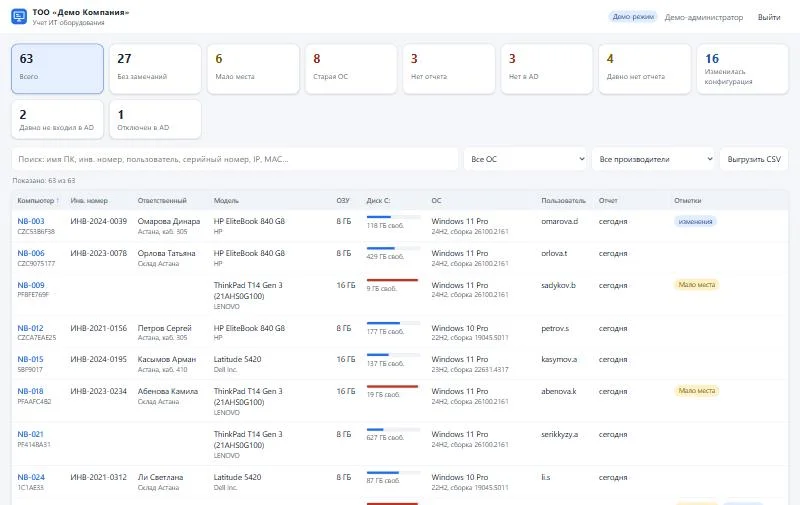
AD Inventory — accounting for company computers: what hardware, what OS, who works, how much disk space, and what has changed since last time. Everything works within the company network — without internet, clouds, or external CDNs.
🔒 Since 17.11.2026, the source code of the AD Tools series is provided upon request: leave a request. The showcase of the series is github.com/WorkTime-kz/ad-tools.
A three-part package: the agent collects information about the computer, Lite creates one HTML file from reports, and the full version features a web interface with change history and manual accounting.
| Link |
|---|
| 📦 | Repository — agent, Lite, and full version |
In this part:
What's New (November 2026)
Version 1.1.0. Briefly, what has changed since November 13:
Looking for:тестировщики с реальным ADконтрибьюторыобратная связь от админов

🌐 Machine-translated from Russian. Show original
In this part:
What we will get
- Employees log into GLPI with a domain login and password; their cards (full name, mail, phone, department) come from AD.
- Each computer sends to GLPI once a day: model, serial number, processor, memory, disks, monitors, installed software, and the end user.
- The "laptop not working" request is immediately linked to the specific device and its history.
Step 1. Service account in AD
Create a user svc-glpi — a regular domain user without administrative rights, a complex password, "password expiration date" (and save it to the password manager). This is enough to read the directory.
At the same time, create a GLPI-Users group (who can sign in) and, if desired, GLPI-Tech (techniques). About AD and groups — in the "Active Directory and Group Policies" series.
Step 2. Connecting LDAP to GLPI
Configuring → Authentication → LDAP directories → Add (you can use the Active Directory preset — it will fill in the fields):