AD Access: the employee requests access to the AD group themselves, the owner agrees, temporary access is revoked by themselves
🌐 Machine-translated from Russian. Show original
AD Access is a self-service portal for access to Active Directory groups. The employee requests access to a folder, system, or service themselves, the resource owner approves the request, the service account adds the employee to the AD group, and temporary access is revoked automatically after the deadline. Once every N days, owners confirm who still needs access, and the auditor receives the log and reports in CSV. It is deployed within the company — without publishing on the internet and without a database. Interface — in Russian and Kazakh.
🔒 Since 17.11.2026, the source code of the AD Tools series is provided upon request: leave a request. The showcase of the series is github.com/WorkTime-kz/ad-tools.
| Link | |
|---|---|
| 🔐 | AD Access — source code and instructions |
In this part:
What's New (November 2026)#
Version 1.1.0. Briefly, what has changed since November 13:
- 🛡️ Security audit and
docs/SECURITY.mddocument with threat model. Fixed five findings: entry limit no longer bypasses domain prefix and parallel requests; directory group nested in "Domain Administrators" is not issued (checking nesting in protected groups by SID, denied if in doubt); exit from session experiences service restart; account disabled in AD immediately loses approval rights; approval and revision check membership andmanagedBywithout cache, and requests without votes go to new approvers. - 🧩 Common ad-tools-core kernel. Controller connectivity,
.envparsing, log, signed sessions, limits, query source verification, and SMTP client are now common across the entire series. The portal's own stricter measures after the audit have been retained. After the update, users will log in once again — the cookie format has changed. - 🪟 Windows login (Kerberos/SPNEGO) — verified on Samba AD; on Windows Server AD and not yet tested in browsers. Disabled by default; no ticket — standard form, roles, and clearance are verified the same way as password login.
- 🇰🇿 Kazakh interface. "Rus / Қаз" switch on all pages, including administration; without language selection, it is taken from browser settings. Errors, emails (to each recipient in their language), and CSV report headers are sent in the selected language. Translation is prepared using AI; edits by native speakers are welcome.
- ⚙️ CI on GitHub Actions: unit tests on Node 20 and 22 on Linux and Windows and an integration run against the real Samba AD controller on the ad-testlab stand.
- 🐞 Fix for running on Samba AD: searching for protected groups by domain SID did not find any groups (only built-in groups were considered protected) — now the filter is built from the original SID bytes.
- 📦 The portal can be installed together with the entire series with a single command — through ad-tools-suite.
Why#
"Give access to the accounting folder," "VPN needed for business trips," "temporarily make a local admin" — such requests usually come via email or chat, the administrator manually adds a person to the group, and then forgets to remove them. After a year, no one remembers who is in the group and why.
AD Access makes the process transparent: the decision is made by the resource owner, not the administrator, each access has a justification and deadline, and regular reviews and logs allow the auditor to respond to who, when, and with whose consent accessed it.
What he can do#
- 📚 Resource directory. The administrator selects which AD groups are visible in the directory and writes a clear name, category, and description of what grants access. You can set a maximum term for the card — for example, "local administrator — no more than 7 days."
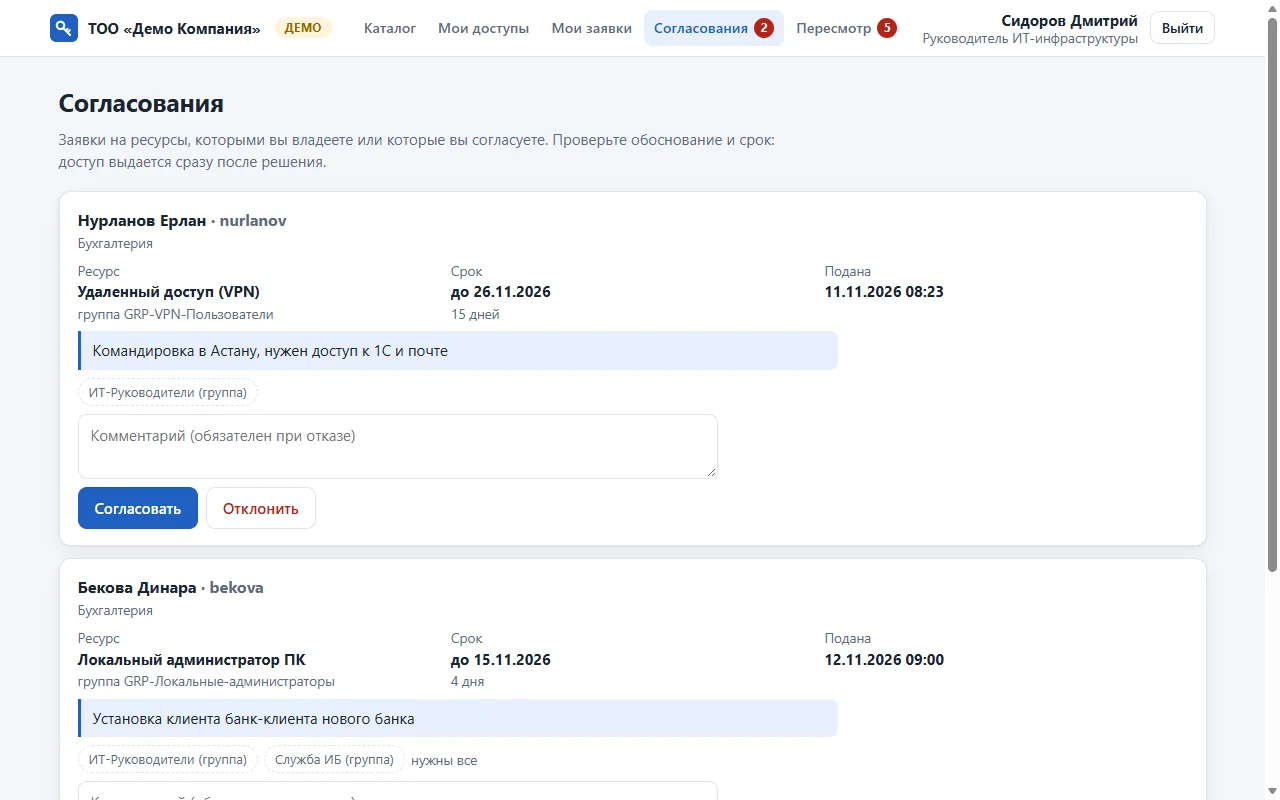
- 📝 Application. The employee searches for the resource, writes a justification, and chooses a deadline: indefinite or until the date.
- ✅ Owner approval from the
managedByattribute. The owner can be a user or a group — in this case, any participant agrees, and nested groups are also counted. You can add additional matchers (for example, an IS service) and choose the order: "one is enough" or "all needed." - ⚖️ Separation of responsibilities. You cannot approve your own request; the owner's request is decided by the portal administrator. The administrator can replace owners only when
ADMIN_OVERRIDEis enabled, and such a decision is recorded in the log. - ⏳ Automatic issuance and removal. After approval, the portal itself adds the employee to the group. Temporary access is valid until the end of the selected day: an email is received in advance, then access is revoked. Extend — with a new request from the "My Accesses" page. If AD refuses to change the group, the request receives the status "issuance error," and the administrator receives the letter and the "Repeat" button.
- 🔄 Access recertification. Once every N days (default 90), owners receive a list of direct members of their groups and decide to "keep" or "remove" each, possibly for several lines at once. Before the deadline — reminder. If the owner does not respond, access is revoked, escalated to administrators, or saved with a "no confirmation" mark — this is configured.
- 👤 "My Accesses" and "My Requests." The employee sees their access with deadlines and the progress of requests — who has already approved it and who has not. Unnecessary access can be refused yourself.
- 📊 Log and reports for the auditor. Every action is recorded: logins, tickets, decisions, group changes, uploads. Five CSV reports for Excel (with formula protection): tickets, issuances, current group members — via or bypassing the portal, review results, and log. The auditor works read-only.
- ✉️ SMTP notifications (optional): new request, decision, imminent expiration, access removal, start of review, reminder, escalation, issuance errors.
Security#
| Measure | How is |
|---|---|
| Minimum rights | The service account only has the right to change the member of groups in the dedicated OU. npm run check-ldap changes nothing and shows the actual rights for allowedAttributesEffective |
| Privileged groups | groups with adminCount=1 and protected SID groups (domain administrators, etc.) cannot be added to the directory; before each issuance, this is checked again, including nesting in protected groups |
| Connecting to AD | Only LDAPS or StartTLS with certificate validation and switching to another domain controller in case of failure; values in LDAP filters are shielded according to RFC 4515 |
| Login and sessions | Domain password, sessions in signed HMAC cookies (HttpOnly, SameSite=Strict), session recall at exit is saved even after restarting; separate login and IP attempt limits |
| Sign-in via Windows | Kerberos/SPNEGO optional, disabled by default; tested on Samba AD, Windows Server AD, and browsers not yet tested |
| Disabled accounts | Each request checks that the account exists and is enabled; reconciliation and revision — without cache |
| CSRF and browser | Mandatory application/json and Originverification; strict CSP without unsafe-inline; HTTPS |
| Attack surface | Single dependency (ldapts), without CDN or build; data — in data/state.json and log data/journal.jsonl |
The threat model found during the vulnerability audit and known limitations are described in docs/SECURITY.md.
Under the hood#
Node.js 22+ on bare node:http, the only dependency is ldapts. Connection to AD, sessions, limits, log, and SMTP are from the common core of the ad-tools-core series (folder src/core/). Vanilla JavaScript interface without building, ru/kk dictionaries are in public/i18n/, storage is JSON files. Built-in scheduler monitors access times and review campaigns.
Try it without AD#
Required Node.js 22 or newer:
npm ci
npm run demo      # http://localhost:8443
In demo mode, AD is not needed: the catalog, requests, and pending review are already completed, and emails are shown on the "Demo Mail" page. The password for all demo users is demo.
| Login | Role |
|---|---|
ivanov | Employee: request access |
petrova | Owner of accounting groups: approvals and revisions of |
sidorov | Owner through the "IT Executives" group |
morozov | Information Security Service, second coordinating |
admin | Portal Administrator |
auditor | Auditor: journal and reports |
Installation in your own domain#
The repository contains detailed instructions for administrators (docs/INSTALL.md, 13 sections): preparing AD (OU for access groups, portal role groups, service account, LDAPS), delegating the right to "change member" in three ways — delegation wizard, dsacls command, and via PowerShell — as well as verifying and revoking these rights. Next — group owners (managedBy), installation on Windows Server (service via WinSW), Linux (systemd), and Docker, HTTPS, initial directory configuration, review, mail, operation, and audit, troubleshooting, and security checklist.
Requirements: Windows Server 2016+, Linux, or Docker; Node.js 22+ (not required for Docker); access to domain controllers via LDAPS (TCP 636). 1 vCPU and 256 MB of RAM are sufficient.
Project status#
- GPL-3.0 license, version 1.1.0; source code available upon request.
- Covered by auto-tests (59 tests per
node --test, all passing): requests, approval, deadlines, revision, CSRF, roles, CSV, login limit, security audit findings, Kerberos, andru/kkdictionaries. In CI, they run on Nodes 20 and 22 on Linux and Windows. Demo mode is tested in the browser with a pass-through scenario: VPN request, participant-owner approval, granting access, and emails in demo mail. - The LDAP code is checked on a real Samba AD controller ( ad-testlab stand) with every change: login in different forms,
managedBy(user, group, empty), transitive membership, granting and revoking access, AD refusal when attempting to change a group outside the dedicated OU. - Operation on Windows Server AD has not yet been verified: Samba does not set
adminCount, does not reproduce all Windows error codes, and the SPNEGO browser does not reproduce. Therefore, we are looking for administrators willing to try it in the test domain and explain what happened.
How to help#
- ⭐ Give a star to the ad-tools showcase if the project is useful.
- 🧪 Deploy in the test domain (start with
npm run demoandnpm run check-ldap) and write in the comments what worked and what didn't. - 🔍 Look at the approval and review process through the eyes of a security guard or auditor — what reports are missing?
- 🛠️ Questions and access requests — through the Issues storefront; after gaining access, send issues and pull requests to the service repository.
👉 Repository: source code — upon request, leave a request. Series showcase — github.com/WorkTime-kz/ad-tools.
Comments · 0
No comments yet.Sign in to comment, rate and see all comments.