AD Audit: Active Directory Security Audit — a web dashboard with history and a Lite version in one script
🌐 Machine-translated from Russian. Show original
AD Audit is a tool that checks the Active Directory domain for typical weak spots and shows a clear report: what was found, why it is a risk, what to do, and which team should fix it. It operates within the company network, without internet, external services, or CDNs.
🔒 Since 17.11.2026, the source code of the AD Tools series is provided upon request: leave a request. The showcase of the series is github.com/WorkTime-kz/ad-tools.
Read only. AD Audit changes nothing in AD. Correction commands (Disable-ADAccount, Set-ADUser , etc.) are only shown — the administrator checks and executes them themselves.
| Link | |
|---|---|
| 🛡️ | AD Audit — web dashboard and Lite in one repository |
In this part:
What's New (November 2026)#
Briefly, what has changed in the panel since November 13:
- 🧩 Common ad-tools-core core: AD connection, login, sessions, attempt limit, log, and mail are now shared across the entire series. The panel's own SMTP client has been replaced by the core client. Login
ДРУГОЙ\логинorлогин@чужой.суффиксno longer appears in its namesake account, andldap://without StartTLS is considered a configuration error. - 🪟 Windows login without password (SSO, Kerberos) — directly in the panel via keytab or via IIS/Apache; disabled by default, tested on Samba AD, Windows Server AD, and not yet tested in browsers.
- 🇰🇿 Kazakh interface. Switch "RU | ҚАЗ" in the header and on the login form; check texts, "Why is this a risk," recommendations and errors — in the selected language, the language of messages is set
MAIL_LANG=ru|kk. Lite report, CSV export, and service log remain in Russian. Translation prepared using AI, edits by native speakers are welcome. - ⚙️ CI on GitHub Actions: unit tests on Ubuntu and Windows from Node.js 20 and 22, kernel reconciliation, parsing the Lite script in Windows PowerShell 5.1 and PowerShell 7 and running it from
-Demo, integration tests on Samba AD ( ad-testlab stand). - 🐞 Fix for the run on Samba AD: missing attributes in the AD snapshot now give empty values, not "undefined" or "null" strings, and entries do not drop from the snapshot.
- 📌 The full version now requires Node.js 22+ (requirement
ldapts9.2). - 📦 The panel can be installed together with the entire series with a single command — via ad-tools-suite.
Why#
Unlimited delegation, accounts without a mandatory password, forgotten records of dismissed employees, extra Domain Admins members through nested groups — all this accumulates in any domain for years. AD Audit collects such findings into one report, explains the risk in simple terms, and prompts the fix team. And the launch history shows what has changed since last time: for example, who became an administrator overnight.
What is being checked#
| Checking | Importance of |
|---|---|
| Unlimited Kerberos delegation (except DC) | Critical |
Password not required (PASSWD_NOTREQD) | High |
| Kerberos pre-authentication (AS-REP Roasting) | High |
| Members of privileged groups considering nesting | High |
| Computers with outdated OSes | High |
| Inactive users (threshold customizable) | Medium |
| Password with no expiration date | Medium |
Recurring mail | Medium |
| Inactive computers | Low |
| Password hasn't changed for a long time | Low |
adminCount=1 without administrative rights | Low |
| Disabled accounts in groups | Low |
| Empty groups | Information |
| Employees without a department, manager, or phone | Information |
Privileged groups include Domain/Enterprise/Schema Admins, Administrators, Account/Backup/Server/Print Operators, GPO Creator Owners, Key Admins, and DnsAdmins; disabled, inactive, and weak password entries are marked separately.
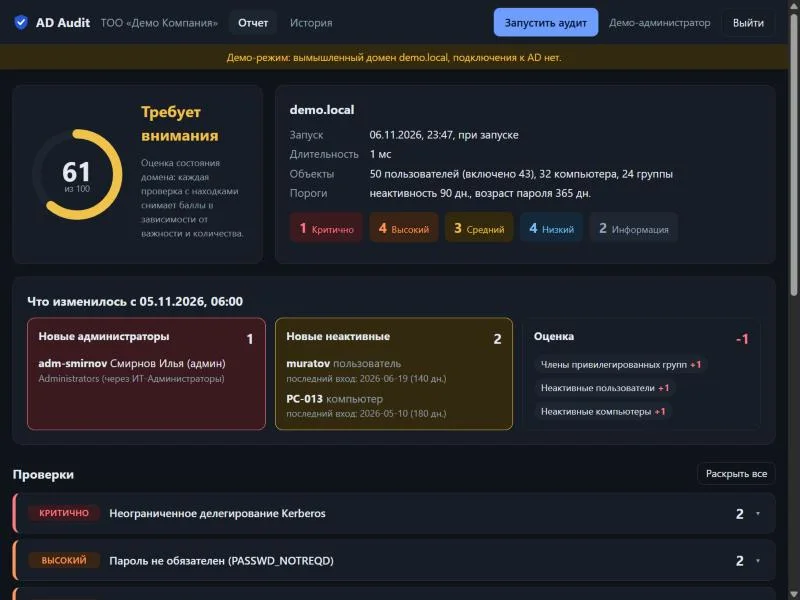
Based on the results, the domain's status is evaluated from 0 to 100: each check with findings deducts points depending on importance and quantity (A ≥ 90 "Good," B ≥ 75, C ≥ 60, D ≥ 40, E — "Critical").
Two options#
| Lite | Full version | |
|---|---|---|
| What is it | a single PowerShell script | a web dashboard on Node.js |
| No installation | required | Windows, systemd, or Docker |
| No credentials | required: operates as the current user or computer | the service account is read-only |
| Result | HTML report and CSV for each check | a panel with summary, history, and chart |
| "What changed" | from the previous launch in the same folder | throughout the |
| Schedule | -Install: daily task on behalf of SYSTEM | built-in, AUDIT_TIME |
| Access | by rights to the report folder | login via domain password or via Windows (Kerberos), only for the administrators group |
| Notifications | — | email when changes |
Both options use the same checks and the same score: results on the same domain snapshot match, and this is verified by a test.
Lite: one script#
lite/ad-audit.ps1 script for Windows PowerShell 5.1. Run on any computer in the domain as a regular domain user:
powershell -ExecutionPolicy Bypass -File .\ad-audit.ps1
A folder reportwill appear next to : ad-audit.html (report), csv\*.csv (export to Excel), and archive\ (past reports).
Daily report (PowerShell as administrator):
.\ad-audit.ps1 -OutDir D:\ADAudit -Install -At 07:00 -ReaderGroup "CORP\IT-Security"
Parameters: -InactiveDays 90, -PasswordAgeDays 365, -SearchBase, -Server, -OutDir, -NoCsv, -KeepDays 90, -Install, -At, -ReaderGroup, -Uninstall, -Demo.
Lite reads attributes available to any domain user. If read is truncated in the domain, some checks will show fewer finds — then run the script as a reader or use the panel with the service account.
Full version: web dashboard#
- 📊 Summary with assessment, importance counters, and a detailed analysis of each inspection.
- 🕓 Launch history and evaluation schedule.
- 🔁 "What has changed since last time": new administrators, new inactive accounts, what appeared and disappeared with each check; new lines are highlighted.
- 🔍 Table filter, "new only" mode, CSV export, copy correction command.
- ⏰ Daily scheduled launch and manual button start.
- 🔐 Domain password login only for members of the specified group (including nested groups).
- 🪟 Windows login without password (SSO, Kerberos) — directly in the panel via keytab or via IIS/Apache; disabled by default, tested on Samba AD, Windows Server AD, and not yet tested in browsers.
- 🇰🇿 Interface in Russian and Kazakh — switch "RU | ҚАЗАҚ", email language —
MAIL_LANG. - ✉️ Email notification for changes — a shared core SMTP client without dependencies (TLS, STARTTLS, AUTH PLAIN/LOGIN).
Panel security: the password is verified by direct connection to the domain controller and is not saved anywhere; login through a trusted domain does not appear in the same domain account; session — signed cookie (HttpOnly, SameSite=Strict, Secure on HTTPS); after 10 failed attempts, login is blocked for 15 minutes; requests from external sites (CSRF) are rejected by the Origin header. The only dependency is the ldaptslibrary, an interface without a build. Connection to AD, login, sessions, Kerberos, SMTP, and log are from the common core of the ad-tools-core series.
Where it takes place:
| Platform | How |
|---|---|
| Windows Server | Windows service (WinSW, LocalService) |
| Linux | systemd service |
| Docker | docker compose up -d --build |
| HTTPS | embedded (PFX or CRT+KEY) or via nginx |
Requirements: Node.js 22+ or Docker (unit tests and demo mode also work on Node.js 20.12+), access to the domain controller via ports 636/389.
Quick start: demo without AD#
Both options can be viewed on the fictional domain demo.local — no AD connection required.
Lite:
.\ad-audit.ps1 -Demo
Panel:
npm ci
npm run demo        # http://localhost:8080, логин demo, пароль demo
For your domain — fill out the .env (as in .env.example) and check the connection:
cp .env.example .env
npm run check-ldap      # проверка подключения и пробный аудит
npm start
The repository includes detailed step-by-step instructions: preparing AD and service account, checking LDAPS, installing on Windows Server, Linux, and Docker, DNS name, HTTPS, email, linking via GPO, working with reports, operation, troubleshooting, and security checklist. Windows login — separately in docs/KERBEROS.md: SPN, ktpass, variables, GPO for Edge/Chrome/Firefox, IIS/Apache, and diagnostics.
Project status#
- GPL-3.0 license; source code is available upon request.
- Covered by autotests: 30 tests — validation engine, assessment, privileged nested groups, "what changed," history, schedule, emails, login and login via trusted domain, Kerberos,
ru/kkdictionaries, and AD snapshot with missing attributes. A separate test (on Windows) outperforms Lite and the full version in a single domain snapshot: all checks and scores match. - The panel and HTML report of Lite are tested in the browser on the demo domain; in CI Lite, it runs with
-Demoin Windows PowerShell 5.1 and PowerShell 7. - The panel code is checked on a real Samba AD controller ( ad-testlab stand) with every change: a snapshot of the entire domain with built-in accounts and controllers, group SIDs, empty group, nesting in Domain Admins, account flags and verification reports based on a real snapshot, domain password login.
- On Windows Server AD, operation has not yet been verified, and Lite has not yet connected to the real domain. There is no SDProp on the Samba stand, and fresh objects have no login history, so
adminCountand inactivity checks there are not indicative. Sending real mail and installing by the service are also unchecked. Therefore, we are looking for administrators ready to try it themselves and share what they found.
How to help#
- ⭐ Give a star to the ad-tools showcase if the project is useful.
- 🧪 Try it on your domain (start with
-Demoornpm run check-ldap) and write in the comments what worked and what didn't. Reviews about false positives and missed checks are especially valuable. - 🛠️ Questions and access requests — through the Issues showcase; after gaining access, send issues and pull requests to the service repository — for example, with new checks.
👉 Repository: source code — upon request, leave a request. Series showcase — github.com/WorkTime-kz/ad-tools
Comments · 0
No comments yet.Sign in to comment, rate and see all comments.