AD LAPS: a password portal for local administrators with a mandatory reason and a log that cannot be inadvertently corrected
🌐 Machine-translated from Russian. Show original
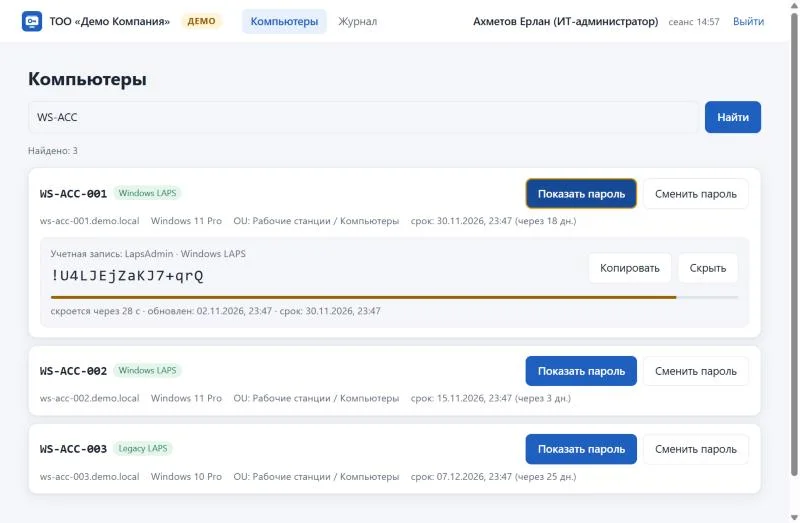
AD LAPS is a web portal for support and administrators: find a computer, view the local administrator password from Windows LAPS or legacy Microsoft LAPS, forcibly change it — with a mandatory reason and a log protected by a hash chain. It is deployed within the company network and is not published on the internet. Part of the AD Tools series.
🔒 Since 17.11.2026, the source code of the AD Tools series is provided upon request: leave a request. The showcase of the series is github.com/WorkTime-kz/ad-tools.
| Link | |
|---|---|
| 🔐 | AD LAPS — source code and instructions |
In this part:
What's New (November 2026)#
Briefly, what has changed since November 13:
- 🛡️ Security audit and
docs/SECURITY.mddocument. The main point: theДОМЕН\логинor UPN login of a trusted domain is no longer mapped to the same domain account (previously, this allowed bypassing the access group and entering the log under someone else's name); the password guessing limit and impression limit count before contacting the AD, so parallel requests do not bypass them; withoutAUDIT_CHAIN_KEY, the portal now warns that the log chain can be recalculated. - 🐞 Fix for running on Samba AD: reading and rotation on the real directory responded to "Computer not found" —
ldaptscorrupted GUID bytes in the string filter. Now theobjectGUIDfilter is assembled from the original bytes. - 🧩 Common ad-tools-core core: reading
.envwith type and<ИМЯ>_FILEvalidation, technical log with levels and masking, controller brute force (LDAPS/StartTLS only), limits, and source verification. Its own, stricter parts — session storage with password encryption, account mapping, security headers — remained in the portal. - 🪟 Login via Windows (Kerberos) — verified on Samba AD; not yet verified on Windows Server AD or browsers; disabled by default. Login without login, but the LAPS password is still read under the employee's account, so before the first view, the portal will ask for the AD password and verify that it is the same account as in the ticket.
- 🇰🇿 Kazakh interface. "Rus / Қаз" switch on all pages, default language — from browser settings, selection is remembered; server errors — in the query language. Translation prepared using AI, edits by native speakers are welcome.
- ⚙️ CI on GitHub Actions: tests on Node 20 and 22 on Linux and Windows and an integration run against the real Samba AD on the ad-testlab booth.
- 📦 The portal can be installed together with the entire series with a single command — through ad-tools-suite.
Why#
LAPS solves the problem of having the same local administrator password on all computers, but passwords have to be viewed through PowerShell or snap-ins — without a single place, without a reason, and without a convenient log of who viewed and why. AD LAPS provides support with an intuitive interface, and security provides security with a trace of every view. It is a sensitive tool, so security is more important than convenience.
The main point: the password is read with the user's own rights#
The portal does not have a service account with password reader rights. The employee logs in with their domain login, and each password read is performed separately by their LDAP bind account. What to give away is decided by the ACL in Active Directory (Set-LapsADReadPasswordPermission), not the portal code. Therefore, the portal shows exactly what an employee would see through Get-LapsADPassword— nothing more.
Access group — portal access only. A service account is not required to search for computers, and npm run check-ldap results in an error if it sees at least one password.
What he can do#
- 🔎 Search for computer by initial name: OS, OU, LAPS type, password expiration.
- 👁️ Password display only upon explicit click and only with a reason or request number. The password is hidden after 30 seconds, when collapsing the tab, and upon exit; there is a "Copy" button.
- 🔄 Forced rotation — the password expiration is set to "now" (
msLAPS-PasswordExpirationTime/ms-Mcs-AdmPwdExpirationTime), also with a reason. - 📜 Log of each view and rotation: who, when, computer, reason, IP, result (including "no rights"). File is only added and protected by hash chain (SHA-256 or HMAC-SHA256), verification —
npm run verify-audit. Copy in syslog/SIEM, CSV export for auditors. - 🧩 Windows LAPS (
msLAPS-Password, JSON) and legacy LAPS (ms-Mcs-AdmPwd), including simultaneously during migration. Encrypted passwords (msLAPS-EncryptedPassword) are honestly marked as unsupported — explained in the manual.
Security#
| Threat | What does the portal do |
|---|---|
| The employee looks at passwords not assigned to them | The password is read by the employee's own bind; without permission in ACL AD, the domain controller will not return the attribute. The attempt is logged as denied |
| Hacking the | portal server The process does not have its own password rights. Passwords of logged-in employees are stored in memory with an encrypted AES-256-GCM key, which exists only in their cookies; in REAUTH_BEFORE_REVEAL=true , they are not stored at all |
| Session theft | Strict CSP without unsafe-inline; cookie HttpOnly, SameSite=Strict, Secure, signed HMAC; 15 minutes of inactivity, maximum 8 hours; new reason for each display |
| Login under someone else's account through a trusted domain | ДОМЕН\логин always goes to bind as логин@домен по умолчанию, UPN with someone else's suffix is searched only by userPrincipalName |
| Password guessing through the portal | The IP and login attempt limits are counted before contacting AD — parallel requests do not bypass it |
| CSRF and clickjacking | Mandatory application/json, CSRF token, verification Origin/Sec-Fetch-Site, frame-ancestors 'none' |
| Network interception | Without a certificate, the portal does not start (HTTP — proxy only and with an explicit flag); to AD — only LDAPS/StartTLS with certificate validation; HSTS |
| The password remains in the cache and logs | Cache-Control: no-store; passwords are not written in the activity log, technical log, or syslog — this is checked by tests |
| Bulk upload | User view limit per hour (counted against reading from AD), event blocked in the |
| Log cleanup | Write only (on Windows — ACL without write rights, on Linux — chattr +a); the hash chain detects changes, insertions, deletions, and rearrangements of records; in case of write failure, the password is not shown |
The README contains a complete threat model, and the docs/SECURITY.md contains audit findings and their fixes. The model honestly states what remains with the administrator: deleting records from the end of the file and server substitution by the administrator along with the key will only be detected by an off-server copy (syslog/SIEM and 4662 audit on domain controllers). Outside the model — compromised domain controller, malware on the employee's PC, and encrypted Windows LAPS passwords.
Under the hood#
Node.js 22+ on built-in node:http/node:https. The only dependency is the ldaptslibrary. Connection to AD, .env, log, limits, and HTTP helpers — from the common core of the ad-tools-core series (folder src/core/). Frontend — HTML, CSS, and JavaScript without builds, frameworks, and CDNs, dictionaries ru/kk — in public/i18n/.
Try it without AD#
npm install
npm run demo        # http://127.0.0.1:8114
The demo runs on dummy computers in memory and simulates ACL AD. The password for all demo users is demo:
| Login | What the | will see
| --- | --- |
| it.admin | all passwords, rotation, the entire log, and CSV |
| helpdesk | workstation passwords; on servers — "no rights in AD" |
| auditor | only the log and upload, the passwords are not visible |
| user | login denied: not in the access group |
Find WS or SRV: among demo computers, there are machines with encrypted passwords and without LAPS.
Installation in your own domain#
Briefly for Windows Server:
npm ci --omit=dev
copy .env.example .env      # заполнить
npm run check-ldap          # проверка LDAPS, служебной учетки и пробный вход
powershell -ExecutionPolicy Bypass -File .\deploy\windows\install-service.ps1
The repository contains detailed instructions for administrators (docs/INSTALL.md): how the portal works and why it does not grant extra rights, groups in AD, delegating read and rotating passwords for Windows LAPS and legacy LAPS, why encrypted passwords are not supported, how to check who else sees passwords, password reading audits in AD itself, LDAPS, HTTPS certificate, installation on Windows Server (service via WinSW under LocalService), Linux (systemd) and in Docker, proxy work, Windows login (Kerberos), and why the LAPS password is still read under employee accounting, log and SIEM, operation, troubleshooting, and security checklist.
Project status#
- GPL-3.0 license, source code available upon request.
- Covered by autotests (54 tests per
node --test, all passing): LAPS attribute parsing, sessions, hash chain and substitution detection, missing passwords in logs, CSRF, headers, ACL in demo, refusal to show password when log unavailable, refusal to start without HTTPS, security audit findings, Kerberos andru/kkdictionaries. In CI — on Node 20 and 22, on Linux and Windows. - Demo mode tested in the browser: display and rotation, "no rights in AD" denial, encrypted password marking, auto-hide, log integrity check.
- The LDAP code is checked on a real Samba AD controller ( ad-testlab stand) with every change: Windows LAPS, legacy LAPS, both at once, encrypted password, and computer without LAPS; reading through a nested group; employees without rights and the service account do not see the password; rotation — only with the right to reset.
- On Windows Server AD, operation has not yet been verified: on the stand, LAPS values are written by the content, not by the LAPS client. Also unchecked are launches in Docker and systemd, as well as service installation via WinSW.
- Therefore, we are looking for administrators ready to try it in a test domain and share what they achieved.
How to help#
- ⭐ Give a star to the ad-tools showcase if the project is useful.
- 🧪 Deploy in the test domain (start with
npm run demoandnpm run check-ldap) and write in the comments what worked and what didn't. - 🔍 Take a fresh look at the threat model — warnings from security experts are especially valuable.
- 🛠️ Questions and access requests — through the Issues storefront; after gaining access, send issues and pull requests to the service repository.
👉 Repository: source code — upon request, leave a request. Series showcase — github.com/WorkTime-kz/ad-tools.
Comments · 0
No comments yet.Sign in to comment, rate and see all comments.