AD SSPR: the employee changes and resets the domain password themselves and unlocks the account — without calling IT
🌐 Machine-translated from Russian. Show original
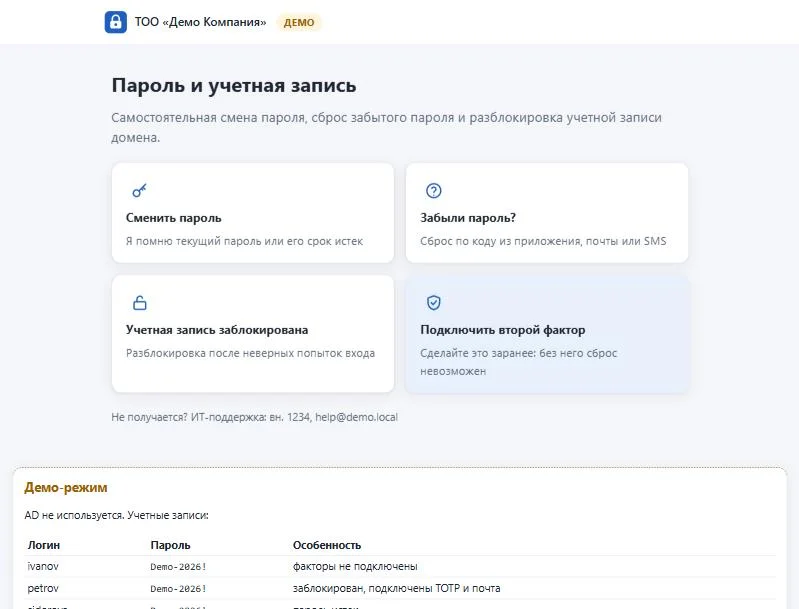
AD SSPR is a portal where an employee changes the domain password themselves, resets the forgotten password, and unlocks their Active Directory account — without calling IT support. It is deployed on an internal server: no internet, external services, CDN, or database required.
🔒 Since 17.11.2026, the source code of the AD Tools series is provided upon request: leave a request. The showcase of the series is github.com/WorkTime-kz/ad-tools.
| Link | |
|---|---|
| 🔑 | AD SSPR — source code and instructions |
In this part:
What's New (November 2026)#
Briefly, what has changed since November 13:
- 🛡️ Security audit and
docs/SECURITY.mddocument. Login and password change attempts now count against accessing AD — parallel requests no longer bypass the failure limit. After changing or resetting the password, portal sessions opened with the old password immediately lose login and incomplete reset. - 🐞 Fix for running on Samba AD: domain groups ("Domain Administrators," Enterprise Admins, etc.) were not located by SID —
ldaptscorrupted bytes in the string filter, and nested membership checks in protected groups relied only onadminCountandtokenGroups. Now the filter is built from the original bytes of the SID, and if the "Domain Administrators" group is not found, the portal fails (fail closed). - 🧩 Common ad-tools-core core: reading
.env(secrets can be transferred as files), controller connections, sessions, limits, AD error classification, SMTP client, and secret masking log are now common across the entire series. Where the portal is stricter than the core, its own measures are left. - 🪟 Login via Windows (Kerberos) — verified on Samba AD; not yet verified on Windows Server AD or browsers; disabled by default. On a domain computer, the password change form is inserted automatically, but the current password is still needed, and resetting the forgotten password, unlocking, and activating factors with a ticket do not unlock.
- 🇰🇿 Kazakh interface. "Rus / Қаз" switch on all pages, default language — from browser settings; errors, emails, and SMS — in the selected language. Translation prepared using AI; edits by native speakers are welcome.
- ⚙️ CI on GitHub Actions: unit tests on Node 20 and 22 on Linux and Windows, then integration tests against the real Samba AD on the ad-testlab booth.
- 📦 The portal can be installed together with the entire series with a single command — through ad-tools-suite.
Why#
"Forgot password" and "account locked" are among the most common support requests. An employee cannot log into Windows, calls IT, and the administrator manually resets the password. AD SSPR allows the employee to do this themselves — but only after verifying the second factor they enabled in advance.
Unlike most tools in the series, this portal modifies AD, so security is more important than convenience.
What he can do#
- 🔁 Changing the password with the current password — including when the password has expired or when "Require password change at the next login" is required.
- 🆘 Resetting the forgotten password and unlocking after verifying the second factor, which the employee previously enabled by logging in with their password:
- authenticator application (TOTP, RFC 6238): Google/Microsoft Authenticator, Yandex Key, FreeOTP, etc. The QR code is generated on the server, without external services;
- optionally — an email code from the AD attribute (SMTP) and an SMS code via the HTTP gateway.
- 📏 Password requirements are visible in advance: length, complexity, history, and expiration date are taken from the domain policy and checked directly upon input. AD (constraint violation,
0000052D) errors are translated into clear hints. - ✉️ Email notifications about password changes and resets, unlocking, factor activation, and suspicious reset attempts.
- 📜 Log all actions to file (JSON Lines), optionally to syslog (SIEM) and webhook.
- 🪟 Login via Windows (Kerberos) is disabled by default: on the domain computer, the login in the password change form is inserted automatically; the current password is still required.
- 🇰🇿 Russian and Kazakh interface — switch on the page, emails, and SMS in the selected language.
- 🌓 Light and dark themes, responsive phone layout.
Security#
| Measure | How is |
|---|---|
| Minimum rights | Separate service account; only "Password Reset" and record lockoutTime |
| Privileged accounts are denied | adminCount=1built-in Administrator/krbtgt, members of protected groups based on nesting, primary group, and groups from other forest domains (through tokenGroups, groups are searched by SID by source bytes), and your DENY_GROUP_DNSlist. The check is repeated before each change; if the "Domain Administrators" group is not found, |
| Encryption only | AD — only LDAPS or StartTLS with certificate validation; portal — only HTTPS (HTTP only in demo) |
| Password and code brute force | IP and login limits, attempts count before contacting AD; 5 incorrect codes per reset session, 10 per day per account — then blocked for 24 hours and a letter to the owner; the same TOTP code cannot be used twice |
| No login listing | Same responses and aligned times for existing, nonexistent, disabled, and privileged accounts |
| Sessions | Server sessions, cookies HttpOnly; Secure; SameSite=Strict, login ID change, CSRF token, and Originverification; one-time 5-minute reset token; after changing or resetting the password, old sessions end |
| Storing secrets | TOTP secrets are encrypted with AES-256-GCM and bound to the objectGUID; instead of mail and phone, their HMAC fingerprints are stored. If the address in AD is changed after connection, the code will not be sent to it |
| Leak-free log | Passwords, codes, and tokens are not transferred to the log; unfound logins are replaced with an HMAC label (sometimes a password is entered in the login field) |
| Browser | Strict CSP without unsafe-inline, X-Frame-Options: DENY, no external resources |
Audit findings and their corrections are docs/SECURITY.md. The instructions honestly list what the portal does not address: if the password is compromised in advance, an attacker can connect their application (mitigation — notification to the owner and code from the old app when replaced); SMS is weaker than the application; the portal server must be serviced as a Tier 1 server.
Under the hood#
Node.js 22+ on node:http and node:crypto. The only dependency is the ldaptslibrary. Connection to AD, sessions, limits, SMTP client, and log are from the common core of the ad-tools-core series (folder src/core/). Frontend in vanilla JavaScript without assembly, ru/kk dictionaries are in public/i18n/, storage is a JSON file with atomic record. TOTP and QR code are implemented in the project without third-party libraries.
Try it without AD#
Required Node.js 22 or newer:
npm ci
npm run demo        # http://localhost:8443
The employee directory is stored in memory; AD is not used. The password for all demo users is Demo-2026!. Emails, SMS, and the current TOTP code for petrov are displayed in the "Demo Mode" panel directly on the page.
| Login | What to check |
|---|---|
ivanov | TOTP, mail, and SMS connections, password change, |
petrov | Locked, TOTP and mail connected — reset and unlock |
sidorova | Password expired — password change |
admin | Privileged — the portal denies |
kuznetsov | Disabled — the portal refuses |
Installation in your own domain#
TLDR:
cp .env.example .env           # заполнить
npm run admin -- gen-key       # ключи ENCRYPTION_KEY и SESSION_SECRET
npm run check-ldap -- --login ivanov
npm start
The repository includes detailed administrator instructions in 17 sections: preparing AD, service account and delegating rights to OUs, LDAPS verification, HTTPS certificate, installation on Windows Server (service via WinSW), Linux (systemd) and Docker, HTTPS via nginx or IIS, mail and SMS, logging and SIEM, shortcut assignment via GPO and second-factor connection campaign, operation, security model, troubleshooting, and security checklist.
Requirements: Node.js 22+ (not required for Docker), access to domain controllers via LDAPS (TCP 636), certificate for the portal site. 1 vCPU and 512 MB of RAM are sufficient; better a separate server or VM rather than a domain controller.
Why there is no Lite version#
Other tools in the series have Lite — a single PowerShell script without settings. For this portal, it is deliberately absent: the portal modifies AD and must operate from a service account with minimal rights, not as the administrator who started it; resetting without the second factor is a hole, and the second factor requires encrypted storage, limits, sessions, and CSRF protection, i.e., a constantly running service. If you only need to change the password by those who remember it, a standard Ctrl+Alt+Del → Сменить парольwill suffice.
Project status#
- GPL-3.0 license, source code available upon request.
- Covered by auto-tests (68 tests per
node --test, all passing), in CI — on Nodes 20 and 22, on Linux and Windows; demo mode tested in the browser. The code passed review and security audit: the identified issues (bypassing attempt limits, login enumeration by response time, live sessions after password changes, etc.) were fixed and resolved with tests. - The LDAP code is checked on the real Samba AD controller ( ad-testlab stand) with every change: search, domain policy, denial of privileged (including via nested group), disabled and out-of-base accounts, password change with old check, reset with unlocking of delegated account, AD denial outside the OU and on other attributes,
tokenGroups. - Operation on Windows Server AD has not yet been verified. Real SMTP, SMS gateway, and syslog, installation by Windows, systemd, and Docker, and QR code scanning by the phone app have also not been verified.
- Therefore, we are looking for administrators ready to try it in a test domain and share what they achieved.
How to help#
- ⭐ Give a star to the ad-tools showcase if the project is useful.
- 🧪 Deploy in the test domain (start with
npm run demoandnpm run check-ldap) and write in the comments what worked and what didn't. - 🔍 Take a fresh look at the security model — comments from security experts are especially valuable.
- 🛠️ Questions and access requests — through the Issues storefront; after gaining access, send issues and pull requests to the service repository.
👉 Repository: source code — upon request, leave a request. Series showcase — github.com/WorkTime-kz/ad-tools.
Comments · 0
No comments yet.Sign in to comment, rate and see all comments.